Your internet is fast…
but your WiFi still feels slow.
Videos buffer.
Zoom calls lag.
And somehow… the signal disappears the moment you walk into another room.
Sound familiar?
Here’s what most people get wrong 👇
They blame their internet plan.
So they upgrade to higher speeds…
pay more every month…
and nothing really changes.
👉 Because the real problem isn’t your internet.
It’s your router.
In fact, an outdated or low-quality router can bottleneck your entire connection — even if you’re paying for high-speed internet.
And this is exactly why more people in 2026 are switching to WiFi 6 routers.
WiFi 6 isn’t just about speed.
It’s built for modern homes where:
- multiple devices are always connected
- streaming, gaming, and work happen simultaneously
- and stability matters more than just “Mbps numbers”
The best part?
👉 You don’t need to spend hundreds of dollars.
There are some incredibly powerful best WiFi 6 routers under $100 that can:
- eliminate dead zones
- handle multiple devices smoothly
- improve speed, stability, and overall performance instantly
— without upgrading your internet plan.
So what will you find in this guide?
Instead of confusing specs and technical jargon…
I’ve broken everything down in a simple, real-world way:
✔️ The best WiFi 6 routers under $100 (Researched by real use cases)
✔️ Which router is best for gaming, apartments, or work-from-home setups
✔️ How to choose the right router for your needs (without wasting money)
✔️ And even how to fix common WiFi issues like slow speed, weak signal, and dead zones
If you’re tired of slow WiFi…
and want a real solution (not just another upgrade trap)…
👉 Let’s find the perfect router for you.
If you’re in a hurry, here’s what to buy and who it’s for. Tap any pick to check the latest price on Amazon.
What is WiFi 6 & Is It Worth It in 2026?

What is a WiFi 6 Router?
A WiFi 6 router (also known as 802.11ax) is the latest generation of wireless technology designed to deliver faster, more stable, and more efficient internet — especially in homes with multiple connected devices.
Unlike older routers, WiFi 6 doesn’t just focus on speed.
It focuses on handling multiple devices at the same time without slowing down your network.
So whether you’re working, streaming, gaming, or using smart devices — everything runs smoothly together.
WiFi 6 vs WiFi 5 vs WiFi 7 (Simple Difference)
- WiFi 5 (802.11ac): Older standard. Works fine for basic usage but struggles when many devices are connected at once.
- WiFi 6 (802.11ax): A major upgrade. Better speed, stability, and performance for modern homes with multiple devices.
- WiFi 7 (latest): Even faster and more advanced, but expensive and not necessary for most users right now.
👉 In simple terms:
WiFi 6 is the perfect balance between performance and affordability in 2026.
According to CNET, modern WiFi 6 routers are designed to handle multiple devices more efficiently while improving speed and reducing network congestion.
Benefits of WiFi 6 Routers
Here’s why more people are switching to wifi 6 routers:
1. Faster and More Efficient Speeds
WiFi 6 improves speed, but more importantly, it distributes bandwidth smarter — so all your devices get consistent performance.
2. Better Performance with Multiple Devices
Whether it’s phones, laptops, TVs, or smart home devices — WiFi 6 can handle them all simultaneously without lag.
3. Lower Latency (Less Lag)
Perfect for gaming, video calls, and streaming — you’ll notice fewer delays and smoother performance.
4. Stronger and More Stable Connections
WiFi 6 provides better signal reliability, reducing dropouts and weak zones in your home.
Is It Worth Buying a WiFi 6 Router in 2026?
Yes — for most people, it’s absolutely worth it.
If you:
- experience slow WiFi or buffering
- have multiple devices connected
- work from home or attend online meetings
- use streaming, gaming, or smart home devices
👉 then upgrading to a WiFi 6 router can significantly improve your experience.
Even better, you can now find the best WiFi 6 routers under $100, making it a smart and budget-friendly upgrade.
Which Are the Best WiFi 6 Routers Under $100 in 2026?

If you’re looking for the best WiFi 6 routers under $100, these are the top-performing options based on real-world usage, performance, and value for money.
Let’s break them down one by one:
#1 TP-Link AX1800 (Archer AX21) (Best Overall)

- DUAL-BAND WIFI 6 ROUTER: Wi-Fi 6(802.11ax) technology achieves faster speeds, greater capacity and reduced network conge…
- AX1800: Enjoy smoother and more stable streaming, gaming, downloading with 1.8 Gbps total bandwidth (up to 1200 Mbps on …
- CONNECT MORE DEVICES: Wi-Fi 6 technology communicates more data to more devices simultaneously using revolutionary OFDMA…
Best For:
This router is best for people who are tired of everyday WiFi issues at home — like slow speeds during work, buffering while streaming, or unstable connections when multiple family members are online.
If you’re working from home, attending Zoom calls, streaming Netflix, or your kids are using multiple devices at the same time… and your internet keeps slowing down or dropping — this router is built exactly for that situation.
It’s ideal for:
- Families with multiple devices
- Work-from-home professionals
- Students attending online classes
- Anyone frustrated with ISP routers
Problem It Solves:
Most people think their internet plan is slow…
So they upgrade their speed, pay more money — and still face:
- buffering videos
- lag during meetings
- weak signal in other rooms
- slow speeds when 3–4 devices are connected
The real issue?
Your router can’t handle modern usage.
The TP-Link AX21 solves this by:
- distributing bandwidth properly across devices
- maintaining stable speed even when multiple users are online
- improving signal strength across your home
So instead of upgrading your internet plan…
you fix the actual bottleneck.
Why This Router is a Great Choice:
What makes this one stand out among the best WiFi 6 routers under $100 is its balance.
It doesn’t try to be overly complex or overloaded with features.
Instead, it focuses on what most people actually need:
✔ reliability
✔ stability
✔ consistent performance
It’s one of those routers where you set it up once… and everything just works better.
That’s why it’s often recommended as the best WiFi 6 router for home users who want a simple but powerful upgrade.
Key Benefits:
• Faster Speeds for Everyday Use
You’ll immediately notice quicker loading times, smoother streaming, and better browsing — especially if you’re upgrading from an old router.
• Stable Connection Across Multiple Devices
Whether 2 people or 6 people are using the internet at the same time — it keeps things running smoothly without sudden drops.
• Improved Signal Strength
It helps reduce weak zones and gives more consistent coverage across rooms in small to medium homes.
• Better Overall Network Efficiency
Instead of one device taking all the bandwidth, it ensures balanced performance across all connected devices.
Real User Experience:
Many users who switched from their ISP router said something very similar:
“I thought my internet was slow… but after upgrading the router, everything changed.”
People reported:
- smoother Zoom calls without freezing
- no buffering while streaming HD or 4K content
- stable performance even with multiple devices connected
Some even mentioned that they were planning to upgrade their internet plan — but after using this router, they didn’t need to anymore.
Pros:
✔ Very easy to set up — even for beginners with no technical knowledge
✔ Reliable performance for daily use (work, streaming, browsing)
✔ Handles multiple devices without noticeable slowdown
✔ Great value for money under $100
✔ Perfect upgrade from basic ISP routers
Cons:
✖ Not designed for hardcore gaming setups with advanced customization
✖ Coverage may not be enough for very large or multi-floor homes
✖ Lacks some premium features found in high-end routers
Final Verdict:
If you are looking for a no-risk, high-value upgrade that solves most common WiFi problems…This is the router most people should buy.
It’s simple, reliable, and effective — making it one of the best WiFi 6 routers under $100 for everyday use.
#2 NETGEAR Nighthawk RAX36
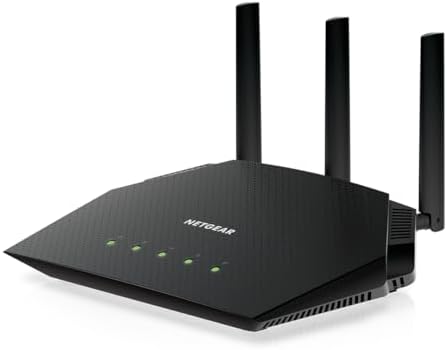
- Coverage up to 2,000 sq. ft. for up to 25 devices
- Ultrafast AX3000 speeds up to 3Gbps with WiFi 6 technology for uninterrupted streaming, HD video gaming, and web confere…
- This router does not include a built-in cable modem. A separate cable modem (with coax inputs) is required for internet …
Best For:
This router is best for people who use the internet heavily every day — especially if you’re into gaming, streaming, or working with high-bandwidth tasks.
If you’ve ever experienced:
- lag while gaming 🎮
- buffering during Netflix or YouTube
- slow speeds when multiple people are online
then this router is designed specifically for your situation.
It’s ideal for:
- Gamers looking for smoother gameplay
- Streamers watching HD/4K content
- Families with heavy internet usage
- Users frustrated with performance drops
Problem It Solves:
You might have a fast internet plan…
But the moment:
- someone starts streaming
- someone joins a Zoom call
- or multiple devices connect
everything slows down.
Gaming starts lagging.
Streaming buffers.
Calls freeze.
This happens because your router can’t handle high traffic efficiently.
The NETGEAR Nighthawk RAX36 solves this by:
- prioritizing performance-heavy tasks
- maintaining speed under load
- reducing lag and buffering significantly
Why This Router is a Great Choice:
Among the best WiFi 6 routers under $100, this one stands out for performance-focused users.
It’s not just about basic browsing —
it’s built for people who actually push their internet to the limit.
Whether you’re gaming, streaming, or multitasking…
This router ensures your connection stays fast, stable, and responsive.
That’s why it’s often considered one of the best WiFi 6 router for gaming and streaming.
Key Benefits:
• Smoother Gaming Experience
Reduced lag and better responsiveness — especially important for online multiplayer games.
• Better Streaming Quality
No more buffering interruptions while watching HD or 4K content.
• Handles Heavy Traffic Easily
Even with multiple devices connected, performance stays consistent.
• Upgrade from ISP Routers
You can replace your basic ISP router and unlock full performance.
Real User Experience:
Users who switched to this router often say:
“Gaming feels smoother, and streaming doesn’t buffer anymore.”
Many reported:
- noticeable reduction in lag during gameplay
- faster loading times
- stable performance even during peak usage
Some even replaced their ISP router completely and stopped paying rental fees.
Pros:
✔ Excellent performance for gaming and streaming
✔ Handles multiple devices under heavy load
✔ Improves speed and responsiveness instantly
✔ Strong upgrade for performance users
Cons:
✖ Slightly more complex setup compared to basic routers
✖ Not necessary for light users (overkill for simple browsing)
✖ Coverage may require extender in large homes
Final Verdict:
If your priority is speed, performance, and zero lag…this is one of the best budget WiFi 6 routers for heavy users.
#3 ASUS RT-AX1800S

- New-Gen WiFi Standard – WiFi 6(802.11ax) standard supporting MU-MIMO and OFDMA technology for better efficiency and thro…
- Ultra-fast WiFi Speed – RT-AX1800S supports 1024-QAM for dramatically faster wireless connections
- Increase Capacity and Efficiency – Supporting not only MU-MIMO but also OFDMA technique to efficiently allocate channels…
Best For:
This router is best for people who want full control over their home network — especially if you have multiple users, smart devices, or concerns about security and privacy.
If you’ve ever wondered:
- “Who is using my WiFi right now?”
- “Why is my internet suddenly slow?”
- “Can I control or block certain devices?”
then this router is built exactly for your needs.
It’s ideal for:
- Families with kids (parental control needs)
- Smart home users with many connected devices
- Users who want visibility and control over their network
- Anyone concerned about WiFi security and misuse
Problem It Solves:
Most routers only give you basic internet access…
But they don’t give you control.
So what happens?
- Unknown devices may connect to your network
- One device can consume all bandwidth
- You have no idea what’s slowing your internet
- Security risks go unnoticed
This creates frustration — especially in homes with multiple users.
The ASUS RT-AX1800S solves this by giving you:
- visibility of all connected devices
- control over who can access your network
- tools to manage and optimize usage
So instead of guessing what’s wrong…
you actually know and control your network.
Why This Router is a Great Choice:
What makes this stand out among other best WiFi 6 routers under $100 is its focus on security + smart control, not just speed.
Most routers focus only on performance…
but this one gives you intelligence + control + protection.
You can:
- monitor device activity
- manage access permissions
- keep your network secure
All without needing advanced technical knowledge.
Key Benefits:
• Advanced Security Features
Helps protect your network from unauthorized access and potential threats.
• Full Device Control
You can see every connected device and manage or block them anytime.
• Smooth Multi-Device Performance
Handles multiple smart devices without slowing down your connection.
• Smart Network Management
Gives you better control over how your internet is being used.
Real User Experience:
Users who switched to this router often say:
“For the first time, I actually feel in control of my WiFi.”
Many reported:
- being able to identify unknown devices on their network
- managing kids’ internet usage more effectively
- better overall performance in smart home setups
Some even mentioned that their network felt more organized and stable, not just faster.
Pros:
✔ Strong focus on security and privacy
✔ Excellent device management features
✔ Ideal for smart homes with many devices
✔ Reliable and stable performance
Cons:
✖ Interface may feel slightly advanced for beginners
✖ Not specifically optimized for high-end gaming
✖ Requires some initial setup understanding
Final Verdict:
If your priority is not just speed — but control, security, and smarter network management…this is one of the best WiFi 6 routers under $100 for complete network control.
#4 Linksys MR7350

- STREAM NONSTOP: Linksys Max-Stream MR7350 WiFi router uses Intelligent Mesh to deliver the speed of WiFi 6. With access …
- THE POWER AND RELIABILITY OF WIFI 6: Experience rock solid connectivity with this dual-band WiFi 6 wireless router. An a…
- MORE WIFI FOR MORE DEVICES: Supporting 25+ devices, and up to 1,700 sq ft, this WiFi 6 router sends and receives multipl…
Best For:
This router is best for people who are constantly frustrated because their WiFi doesn’t reach every room in the house.
If your situation looks like this:
- WiFi works perfectly in the living room…
- but becomes weak or unusable in the bedroom
- or you lose signal in corners, balconies, or another floor
then this router is designed exactly for you.
It’s ideal for:
- Apartments and small to medium-sized homes
- Users facing weak signals in specific rooms
- Families experiencing frequent disconnections
- Anyone tired of “dead zones” in their home
Problem It Solves:
One of the most common WiFi problems is not speed…
it’s coverage.
You might already have a decent internet plan, but still face:
- weak signal in certain areas
- slow speeds when you move away from the router
- connection drops in bedrooms or corners
This happens because your router can’t distribute the signal evenly across your home.
So even if your internet is fast…
your experience feels slow and unreliable.
The Linksys MR7350 solves this by:
- spreading WiFi more efficiently across rooms
- reducing weak zones and dead spots
- maintaining stable connection even at a distance
Why This Router is a Great Choice:
What makes this one different from other wifi 6 routers for home is its focus on coverage and consistency, not just raw speed.
It uses built-in mesh capability, which means:
Instead of your WiFi being strong in one room and weak in others…
it creates a more balanced signal across your entire space.
And if needed, you can even expand it later with additional mesh units.
Key Benefits:
• Better Whole-Home Coverage
WiFi reaches more areas of your home with fewer weak spots.
• Reduced Dead Zones
Helps eliminate areas where signal used to drop or slow down.
• Stable Connection Across Rooms
You can move around your home without sudden disconnections.
• Mesh-Ready for Future Expansion
Easily extend your network if your coverage needs grow.
Real User Experience:
Users who upgraded to this router often say:
“WiFi finally works in rooms where it never used to.”
Many reported:
- stable connection in bedrooms and corners
- smoother browsing and streaming across rooms
- fewer disconnections while moving around the house
Some even mentioned that they stopped relying on WiFi extenders after switching to this router.
Pros:
✔ Excellent for improving coverage in apartments and homes
✔ Reduces weak signal areas significantly
✔ Mesh-ready for future upgrades
✔ Stable and consistent performance
Cons:
✖ Not the most powerful option for heavy gaming
✖ May not fully cover very large or multi-floor homes alone
✖ Speed is good, but not focused on high-performance usage
Final Verdict:
If your biggest frustration is WiFi not reaching every corner of your home…this is one of the best WiFi 6 routers under $100 for coverage and stability.
#5 GL.iNet GL-MT3000

- 【DUAL BAND AX TRAVEL ROUTER】Products with US, UK, EU Plug; Dual band network with wireless speed 574Mbps (2.4G)+2402Mbps…
- 【VPN CLIENT & SERVER】OpenVPN and WireGuard are pre-installed, compatible with 30+ VPN service providers (active subscrip…
- 【OpenWrt 21.02 FIRMWARE】The Beryl AX is a portable wifi box and mini router that runs on OpenWrt 21.02 firmware. It supp…
Best For:
This router is best for people who frequently use public WiFi — especially travelers, remote workers, freelancers, and digital nomads who rely on internet access outside their home.
If you:
- work from cafes, hotels, or airports
- travel often and connect to unknown networks
- use public WiFi for important tasks (emails, banking, work files)
then this device is not just useful — it’s essential.
It’s ideal for:
- Remote workers and freelancers
- Business travelers
- Digital nomads
- Anyone concerned about privacy on public networks
Problem It Solves:
Public WiFi is convenient…
But it comes with a hidden risk that most people ignore.
When you connect to hotel, airport, or cafe WiFi:
- you don’t know who else is on that network
- your data can be exposed
- your personal information can be vulnerable
And the worst part?
You don’t even realize when it happens.
At the same time:
- connecting multiple devices while traveling is messy
- switching networks repeatedly becomes frustrating
The GL.iNet GL-MT3000 solves this by:
- creating your own secure private network anywhere
- encrypting your connection using built-in VPN support
- allowing all your devices to connect safely through one network
So instead of trusting public WiFi…
you carry your own secure WiFi system with you.
Why This Router is a Great Choice:
Unlike typical wifi 6 routers for home, this is built for a completely different purpose:
Security + Portability + Control
It turns any public connection into a safe, private environment.
You connect this router to public WiFi once…
and then all your devices connect through it securely.
That means:
- safer browsing
- protected data
- consistent connection across devices
Key Benefits:
• Secure Public WiFi Usage (Built-in VPN Support)
Protects your personal data when using hotel, airport, or cafe networks.
• Portable and Travel-Friendly Design
Small, lightweight, and easy to carry anywhere.
• Connect Multiple Devices Safely
Use one secure connection for your laptop, phone, tablet, and more.
• Backup Internet Solution
Can connect to your phone hotspot and act as a backup router when needed.
Real User Experience:
Users who travel or work remotely often say:
“I no longer worry about using public WiFi.”
Many reported:
- feeling safer while accessing sensitive data
- using it daily during travel without issues
- connecting multiple devices seamlessly without reconfiguring networks
Some even used it at home as a backup internet solution during outages.
Pros:
✔ Built-in VPN for enhanced security
✔ Extremely portable and travel-friendly
✔ Protects data on public networks
✔ Connects multiple devices through one secure network
Cons:
✖ Not designed for full home coverage
✖ Limited range compared to standard routers
✖ More useful for travel than permanent home setup
Final Verdict:
If you travel frequently, work remotely, or rely on public WiFi…this is not just a router — it’s a personal security tool for your internet.
One of the smartest investments you can make for privacy, safety, and convenience on the go.
Best WiFi 6 Routers by Use Case (Smart Buyer Guide)

Not every user needs the same router, and this is where most people make a mistake. Some are dealing with constant lag while gaming, others are frustrated with weak signals in certain rooms, and many just want a smooth, reliable connection for everyday use at home.
Instead of confusing you with technical specs, let’s break it down based on real-life situations so you can easily choose the best WiFi 6 router under $100 for your needs.
🎮 Best WiFi 6 Router for Gaming
If you’re into online gaming, you already know how frustrating lag can be. You might have a good internet plan, but during gameplay, you still experience sudden delays, ping spikes, or even short freezes. This usually happens because your router can’t handle real-time data properly, especially when multiple devices are connected at the same time.
That’s where the NETGEAR Nighthawk RAX36 stands out. It’s built to deliver stable performance even under heavy usage, which is exactly what gamers need.
In a typical household where someone is streaming, another person is on a video call, and multiple devices are connected, this router still manages to keep your gaming experience smooth and responsive.
If your main goal is to reduce lag and enjoy uninterrupted gameplay, this is easily one of the best WiFi 6 routers for gaming in this budget.
🏠 Best Router for Home / Apartment
For most people, the goal is simple — they want fast, stable internet for daily activities like streaming, browsing, and working from home. But in reality, many households face issues like buffering videos, slow speeds during peak usage, or unstable Zoom calls when multiple devices are connected.
The TP-Link AX1800 (Archer AX21) is a perfect fit for this scenario. It’s designed for everyday home use, where multiple devices need to work smoothly at the same time.
Whether it’s a family streaming content, attending online meetings, or simply browsing, this router handles everything without slowing down.
Many users realize after upgrading that their internet wasn’t the problem — their old router was. If you’re looking for a reliable and balanced option, this is one of the best WiFi 6 routers for home use.
📶 Best WiFi 6 Router for Long Range
One of the most common complaints people have is that WiFi works perfectly near the router but becomes weak or unusable in other rooms.
You might notice slow speeds in your bedroom, dropped connections in corners, or dead zones in certain parts of your home. Upgrading your internet plan doesn’t fix this because the real issue is coverage, not speed.
The Linksys MR7350 is designed to solve exactly this problem. It focuses on delivering consistent coverage across your home rather than just high speeds in one spot.
In real-world use, it spreads the signal more evenly, reducing dead zones and maintaining a stable connection even when you move farther away from the router. If your main concern is weak signals or poor coverage, this is one of the best WiFi 6 routers for long range.
✈️ Best Portable WiFi 6 Router (Travel)
If you travel frequently or work remotely, relying on public WiFi can be risky and inconvenient. Hotel or café networks are often slow, unsecured, and require repeated logins for each device. This not only affects performance but also puts your data at risk.
The GL.iNet GL-MT3000 is a great solution for this situation. It allows you to create your own secure private network wherever you go. You can connect it once to a public network and then use it safely across all your devices without reconnecting again and again.
This is especially useful for remote workers, travelers, or anyone handling sensitive information. If security and convenience matter to you while traveling, this is one of the smartest portable WiFi 6 routers you can choose.
How to Choose the Best WiFi 6 Router Under $100 (Step-by-Step)
Buying a router can feel confusing.
You’ll see terms like AX1800, dual-band, MU-MIMO, beamforming…
and honestly — most people don’t even know what matters.
But here’s the truth:
You don’t need to understand everything.
You just need to choose based on your real usage.
Let’s break it down in the simplest possible way
Step 1: Start With Your Usage (This Is Most Important)
Before looking at any specs, ask yourself:
“What do I actually need this router for?”
Because the best WiFi 6 router for gaming is not the same as the best one for a small apartment.
- If you game or stream heavily → you need performance + low latency
- If you live in a small home or apartment → you need stable everyday performance
- If you face weak signal in rooms → you need better range/coverage
- If you travel a lot → you need a portable router
Most people skip this step and end up buying the wrong router.
Step 2: Don’t Get Confused by Speed Numbers (AX1500 vs AX1800)
You’ll often see terms like:
- AX1500
- AX1800
- AX3000
These are speed ratings, but here’s what you should know:
Higher number = better performance (generally)
For under $100:
- AX1500 → good for light usage (browsing, basic streaming)
- AX1800 → best balance (recommended for most users)
If your budget allows, always go for AX1800 — it handles multiple devices much better.
Step 3: Check How Many Devices You Use Daily
This is where WiFi 6 routers really shine.
Think about your home:
- smartphones
- laptops
- smart TVs
- Alexa / smart devices
- tablets
If you have 5–10+ devices connected, your old router will struggle.
WiFi 6 routers solve this by:
- handling multiple devices efficiently
- reducing slowdowns during peak usage
So if your home feels “slow when everyone is online,” this upgrade is worth it.
Step 4: Understand Your Home Size (Range Matters More Than Speed)
Many people think speed is everything…
but in reality, coverage matters more.
Ask yourself:
Where do I actually use WiFi the most?
- Small apartment → almost any good router will work
- Medium home → need better signal strength
- Multiple rooms / walls → need strong coverage or mesh support
If you face:
- weak signal in bedroom
- WiFi drops in corners
Then you don’t need faster internet — you need better range.
Step 5: Look for These Essential Features (Don’t Overthink)
You don’t need fancy features, but make sure your router has:
✔ Dual-band (2.4GHz + 5GHz)
→ for both range and speed
✔ WPA3 security
→ keeps your network safe
✔ App control / easy setup
→ makes life easier
✔ Beamforming & MU-MIMO
→ improves performance with multiple devices
Most good WiFi 6 routers under $100 already include these — just don’t go too cheap.
Step 6: Decide — Replace ISP Router or Upgrade?
A lot of people use the router given by their internet provider (ISP).
But here’s the reality:
ISP routers are usually basic and limited.
If you’re facing:
- slow speeds
- unstable connection
- poor coverage
Replacing your ISP router with a better WiFi 6 router can make a huge difference instantly.
Step 7: Set a Smart Budget (Under $100 Is Enough)
Good news — you don’t need to spend a lot.
Today, you can easily find:
- best WiFi 6 routers under $100
- reliable performance
- solid coverage
- stable multi-device handling
Spending more doesn’t always mean better — choosing the right one does.
How to Setup a WiFi 6 Router (Step-by-Step Guide)
Setting up a new router might sound technical, but honestly—it’s much easier than most people think. You don’t need any advanced knowledge. Just follow these simple steps, and your WiFi 6 router setup will be done within 10–15 minutes.
Whether you just bought a new router or are replacing your old ISP router, this step-by-step guide will help you connect everything properly and get the best performance.
Step 1: Connect Router to Modem
First, take the Ethernet cable that comes with your router.
- Plug one end into your modem
- Plug the other end into the WAN (Internet) port of your WiFi 6 router
The WAN port is usually labeled “Internet” and may have a different color.
This step is important because it connects your router to your internet source.
Step 2: Power On the Router
Now plug in the power adapter and turn on your router.
- Wait for 1–2 minutes
- Let all the lights stabilize
You’ll usually see:
- Power light
- Internet/WAN light
- WiFi signal light
Once these are stable, your router is ready for setup.
Step 3: Open Setup Page (App or Browser)
This is where most people get confused—but it’s actually simple.
You have two options:
Option 1: Use the Router App (Recommended)
Most brands like TP-Link, NETGEAR, and Linksys provide a mobile app.
- Download the app (from Play Store/App Store)
- Follow the on-screen instructions
Option 2: Use Browser Setup
- Connect to the router’s default WiFi (name is on the box or label)
- Open a browser and type:
192.168.0.1 or 192.168.1.1 - Login using default credentials (usually printed on the router)
This is the standard way for how to setup WiFi 6 router manually.
Step 4: Set WiFi Name & Password
Now you’ll be asked to create your network.
- Choose a WiFi name (SSID)
- Set a strong password
Use a password that’s secure but easy for you to remember.
This step is crucial because it protects your network and personal data.
Step 5: Connect Your Devices
Once setup is complete:
- Connect your phone, laptop, TV, and other devices
- Use the new WiFi name and password you just created
That’s it—you’ve successfully completed your WiFi 6 router setup.
Quick Tips for Better Setup
- Place your router in a central location (not in corners)
- Keep it away from walls and metal objects
- Restart your modem once if internet doesn’t work instantly
How to Fix Common WiFi Problems (Slow Speed, Weak Signal)

If your WiFi is slow, buffering, or dropping in certain rooms, you’re not alone. Many people assume their internet plan is the problem—but in reality, most issues come from router setup, placement, or simple fixes that are often ignored.
Before you upgrade anything, try these proven solutions. In most cases, you can fix slow WiFi or weak signal within minutes.
1. Fix Router Placement (Biggest Impact)
This is the #1 reason behind weak WiFi signals.
If your router is:
- placed in a corner
- hidden behind furniture
- near walls or metal objects
your signal will automatically become weak.
What you should do instead:
- Place the router in a central location
- Keep it elevated (table or shelf)
- Avoid placing it inside cabinets or closed spaces
WiFi spreads like a bubble—so better placement = better coverage.
2. Restart or Reset Your Router
Sometimes, the issue is not hardware—it’s just temporary glitches.
If your internet suddenly becomes slow:
- Turn off your router
- Wait for 30–60 seconds
- Turn it back on
This clears memory and refreshes the connection.
If problems continue:
- Do a factory reset (only if needed)
- Reconfigure your settings
This is one of the easiest slow WiFi fixes that actually works.
3. Update Router Firmware
Most people never update their router—and that’s a mistake.
Outdated firmware can cause:
- slow speeds
- connection drops
- security issues
What to do:
- Open your router app or admin panel
- Check for firmware updates
- Install the latest version
Updates improve performance, stability, and security.
4. Switch Between 2.4GHz and 5GHz Bands
Your WiFi router provides two bands:
2.4GHz → Longer range, slower speed
5GHz → Faster speed, shorter range
Use the right one based on your situation:
- If you are far from the router → use 2.4GHz
- If you are close to the router → use 5GHz
Many people stay connected to the wrong band and experience slow speed unnecessarily.
Switching bands can instantly improve performance.
Bonus Tips (Quick Fixes That Actually Help)
- Reduce the number of connected devices if possible
- Avoid interference from nearby networks (especially in apartments)
- Keep your router updated and clean (dust can affect heat/performance)
Where to Buy the Best WiFi 6 Routers (Latest Deals)
If you’re ready to upgrade, the next step is choosing a reliable place to buy your router at the best price.
The easiest and most trusted option is to buy from platforms like Amazon, where you can compare models, check real user reviews, and often find discounts on WiFi 6 routers.
Most of the routers mentioned in this guide — like TP-Link AX1800 (Archer AX21), NETGEAR Nighthawk RAX36, and Linksys MR7350 — are regularly available on Amazon with updated pricing and deals.
Pro Buying Tip
Router prices change frequently due to deals and stock availability.
Always check the latest price before buying — sometimes you can grab a better model at the same price.
Final Note
If you’re wondering where to buy a WiFi router, Amazon remains one of the best choices because of:
- fast delivery
- easy returns
- genuine user feedback
Take advantage of current deals and choose the router that fits your needs.
Also Read These Articles:
- 7 Best Budget Soundbars Under $200 – Affordable Picks That Actually Sound Great
- Best Budget Monitors Under $150 (2026): Affordable Displays for Work, Gaming & Home Office
- 5 Best Budget Gaming Monitors (2026) – Top Picks for Smooth Gaming on a Budget
- Best Noise Cancelling Headphones 2026: 7 Top Picks Under $100-$500
Final Verdict: Are WiFi 6 Routers Worth Buying in 2026?
If you’ve read this far, one thing should be clear — most WiFi problems people face today are not because of slow internet plans, but because of outdated or underperforming routers.
Slow speeds, buffering, lag during gaming, and weak signals in certain rooms are all signs that your current setup isn’t keeping up with your usage.
That’s exactly where WiFi 6 routers make a real difference.
They are designed to:
- handle multiple devices smoothly
- deliver faster and more stable connections
- reduce lag and improve overall performance
And the best part?
You don’t need to spend a fortune anymore. There are plenty of best WiFi 6 routers under $100 that can completely upgrade your experience.
So, is it worth buying a WiFi 6 router in 2026?
Yes — absolutely.
If you:
- work from home
- stream content regularly
- play online games
- or have multiple devices connected daily
…then upgrading to a WiFi 6 router is one of the smartest and most cost-effective decisions you can make right now.
The key is not just buying any router, but choosing the one that fits your specific needs — whether it’s for gaming, home use, long range, or travel.
Final takeaway:
If your WiFi is frustrating you, upgrading your router can fix it instantly — and WiFi 6 is the upgrade that actually delivers. And also explore the top-rated ANC headphones for remote work.
Frequently Asked Questions
What is the best WiFi 6 router under $100?
The TP-Link AX1800 (Archer AX21) is one of the best WiFi 6 routers under $100. It offers a great balance of speed, stability, and performance for home use.
Is WiFi 6 better than WiFi 5?
Yes, WiFi 6 is better than WiFi 5. It provides faster speeds, better performance with multiple devices, lower latency, and improved efficiency in busy networks.
How much does a WiFi router cost?
A good WiFi router typically costs between $50 to $300. However, you can get reliable WiFi 6 routers under $100 that work well for most homes.
Can I use WiFi 6 router with Spectrum?
Yes, you can use a WiFi 6 router with Spectrum. Just connect it to your Spectrum modem, and it will work without any issues.
How many devices can WiFi 6 handle?
WiFi 6 can handle 20–30+ devices efficiently, depending on the router. It is designed to support multiple devices without slowing down.
How to reset WiFi 6 router?
To reset a WiFi 6 router, press and hold the reset button (usually at the back) for 10–15 seconds until the lights blink. This will restore it to factory settings.

Md Afraz Alam is a digital marketing consultant, content strategist, and the founder behind Techfee and USA Tech Deals. Through USA Tech Deals, he shares research-driven home office technology guides, product comparisons, remote work setup tips, and practical tech buying insights designed to help U.S. professionals, freelancers, and remote workers make smarter technology decisions without overspending on the wrong products.