Buying a tech product today is not as simple as it used to be.
There are hundreds of options, endless specifications, aggressive marketing, and confusing reviews everywhere. What looks like a “great deal” today can quickly turn into regret tomorrow.
In fact, most people don’t waste money because they choose the wrong product —
👉 they waste money because they follow the wrong buying process.
And that’s exactly what this guide will fix.
In this complete tech buying guide, you’ll learn:
- And the biggest mistakes you must avoid in 2026
- How to choose the right tech product step-by-step
- What to actually look for before buying
- How to compare products without confusion
- How to research like a smart buyer
Before You Buy Any Tech — Read This First (How to Choose a Tech Product)
Most people don’t choose the wrong tech product because of bad specs — they choose wrong because they skip a simple decision process.
If you follow this checklist, you’ll avoid wasting money:
✔ Know your real use case
✔ Set a realistic budget
✔ Compare only similar products
✔ Check compatibility
✔ Think long-term
Skip this — and you’ll likely regret your purchase.
The best tech product is not necessarily the most popular tech or the most expensive model — it is the one that aligns with your daily workflow, technical requirements, and future needs.
A tech product refers to any electronic device or software designed to improve productivity, communication, entertainment, or connectivity in daily life.
Quick Decision Guide (For Busy Buyers)
In a hurry? Follow this:
- Define your use (work, gaming, basic)
- Set budget
- Pick 2–3 options
- Compare key specs only
- Choose based on workflow fit
Don’t overcomplicate it.
What to Consider Before Choosing a Tech Product
Before you compare specs or look at brands, focus on a few key factors that actually impact your decision.
✔ Your primary use case
What will you use this device for daily — work, gaming, content creation, or general use?
✔ Budget and long-term cost
Think beyond the price tag. Consider accessories, subscriptions, and how long the device will last.
✔ Compatibility with your existing setup
Make sure it works smoothly with your current devices, apps, and ecosystem.
✔ Performance vs real needs
Don’t overpay for features you won’t use. Match specs to your actual workload.
✔ Longevity and support
Check software updates, repair options, and overall durability.
When you focus on these factors first, choosing the right tech product becomes much easier and less overwhelming.
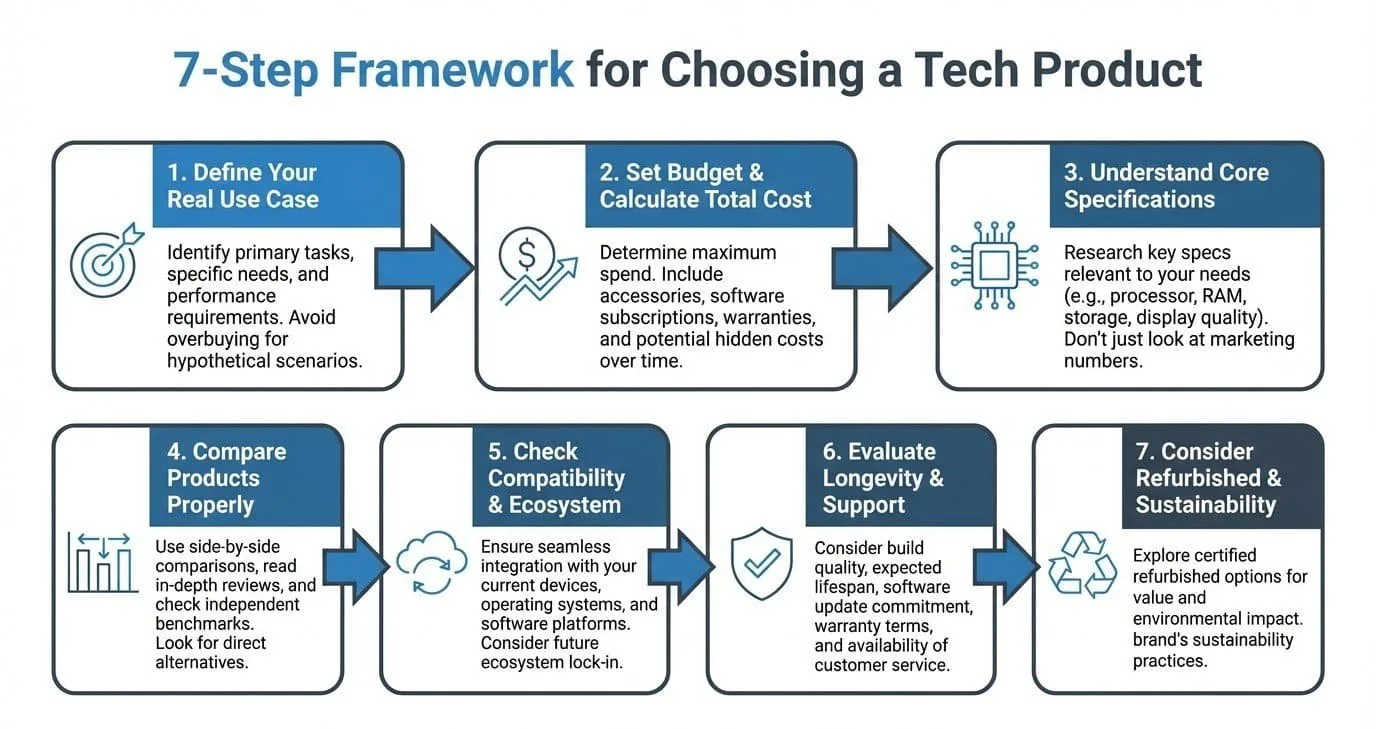
7-Step Framework for Choosing the Right Tech Product
Choosing the right tech product doesn’t have to be complicated.
Follow this simple step-by-step framework to make a smart decision without confusion or overspending.
Step 1 – Define Your Purpose First
Before comparing specs or brands, be clear about what you’ll actually use the device for daily.
Are you working, gaming, creating content, or just browsing?
Your use case determines everything — performance needs, budget, and features.
Choosing tech without a clear purpose often leads to overpaying or buying the wrong product.
👉 See how I evaluate tech products step-by-step → How I Evaluate Tech Products
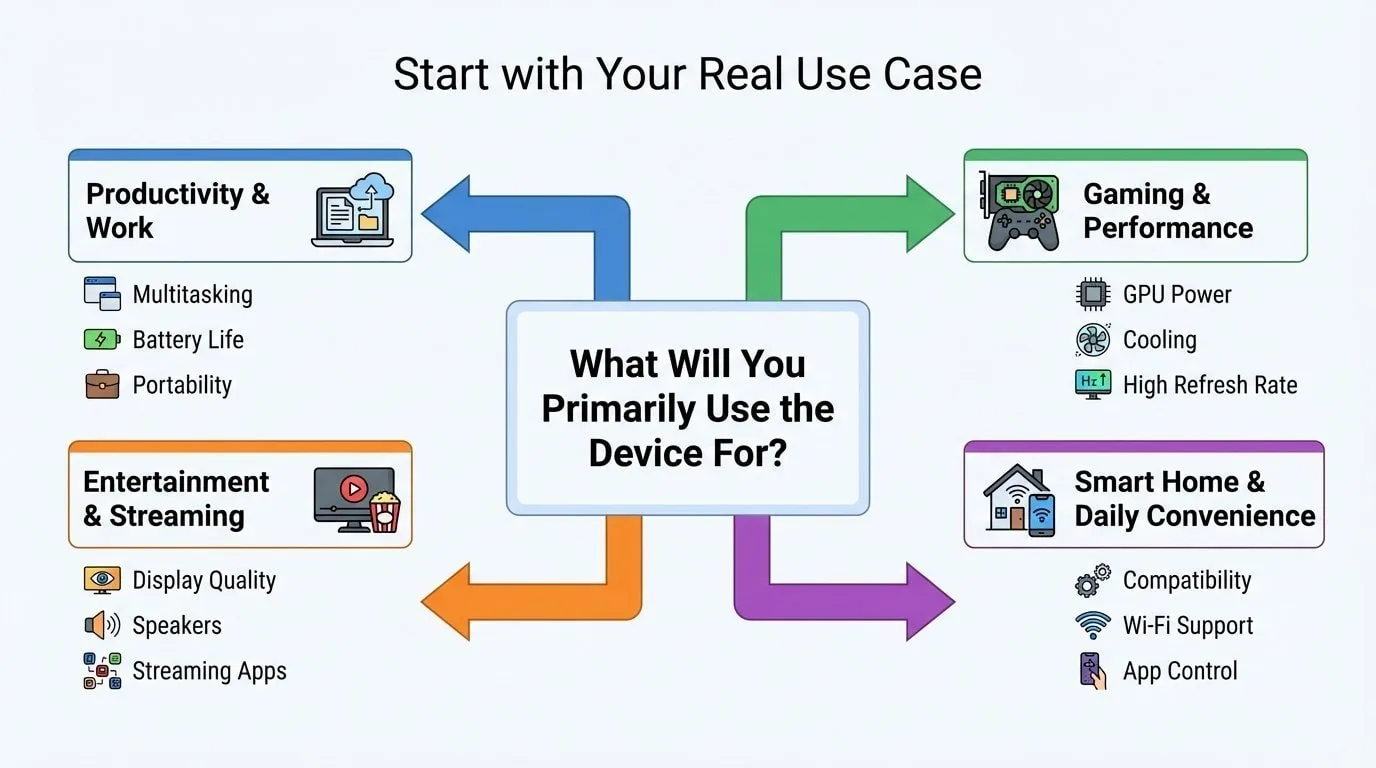
This applies whether you’re choosing productivity tools, gaming devices, smart home equipment, business software, or even exploring tech product ideas. The clearer your purpose, the easier it becomes to choose the product that truly fits your needs.
Step 2 – Set a Budget (Include Hidden Costs)
Don’t just look at the price tag — consider the total cost.
Include accessories, software subscriptions, upgrades, and possible repairs.
A cheaper product may cost more over time, while a slightly higher investment may last longer.
Set a realistic budget range and stick to it.
👉 Use this checklist before buying → Tech Buying Checklist
Step 3 – Focus on Key Specs (Ignore the Noise)
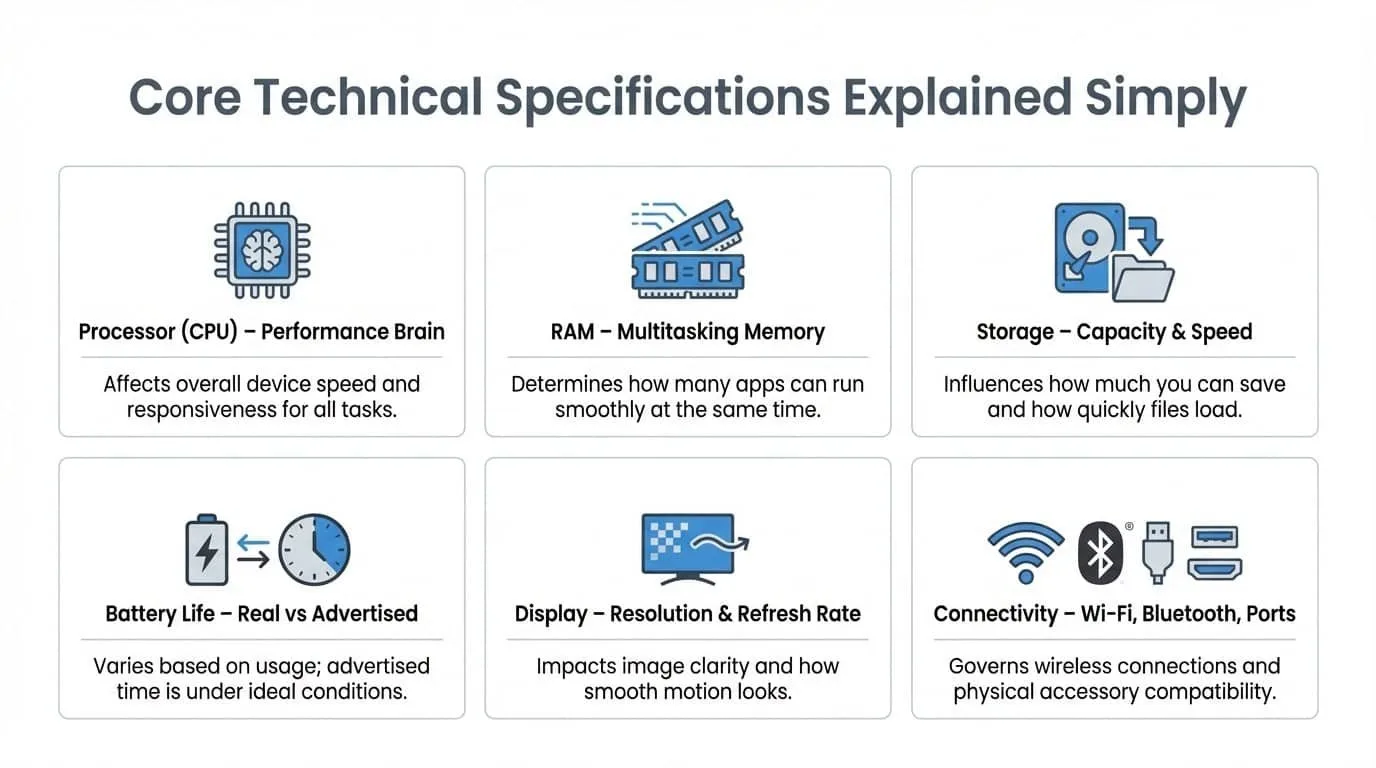
You don’t need to understand every specification — only the ones that matter.
Focus on:
- Processor (performance)
- RAM (multitasking)
- Storage (capacity + speed)
- Battery life (real-world use)
Avoid getting distracted by marketing features that don’t impact your daily usage.
Step 4 – Compare 2–3 Options Only
Too many choices create confusion.
Shortlist 2–3 products within your budget and compare them side-by-side.
Focus on what actually matters for your needs — not what looks better on paper.
👉 Learn how to compare like a pro → How to Compare Tech Products
Here’s a simplified example of how you can structure your evaluation:
| Feature | Device A | Device B | Device C |
|---|---|---|---|
| Processor | Mid-tier | Mid-tier | Higher-tier |
| RAM | 8GB | 16GB | 16GB |
| Storage | 512GB SSD | 512GB SSD | 1TB SSD |
| Battery (Rated) | 10 hrs | 12 hrs | 9 hrs |
| Display | Full HD | Full HD | 2K |
| Upgradeable? | No | Yes | No |
| Warranty | 1 Year | 1 Year | 1 Year |
| Price | $699 | $799 | $999 |
Step 5 – Check Compatibility & Ecosystem
Make sure the device works well with what you already use.
Consider:
- Operating system (Windows, macOS, Android, iOS)
- Apps and software you rely on
- Cross-device syncing
Choosing the wrong ecosystem can create long-term frustration.
Step 6 – Think Long-Term (Not Just Today)
A good tech product should last for years, not months.
Check:
- Software update support
- Build quality
- Upgrade options (if any)
- Repairability
Think in terms of long-term value — not just short-term savings.
Step 7 – Avoid Emotional Buying
Don’t rush your decision because of discounts, hype, or influencer recommendations.
Take a step back and ask:
- Do I really need this?
- Will I use it regularly?
- Does it solve a real problem?
How to Research a Tech Product Before Buying
Before making a final decision, it’s important to do quick but effective research.
Start with YouTube reviews to see real-world performance. Then check verified user reviews on trusted platforms to understand long-term usage.
You can also explore forums like Reddit or tech communities where users share honest experiences.
Focus on:
- Real user feedback
- Performance over time
- Common issues or complaints
Avoid relying only on influencer recommendations or brand marketing.
A few minutes of proper research can save you from making an expensive mistake.
For verified user reviews, you can also check trusted platforms like Consumer Reports, which provide unbiased product testing and long-term performance insights.
Common Mistakes to Avoid When Choosing Tech Products
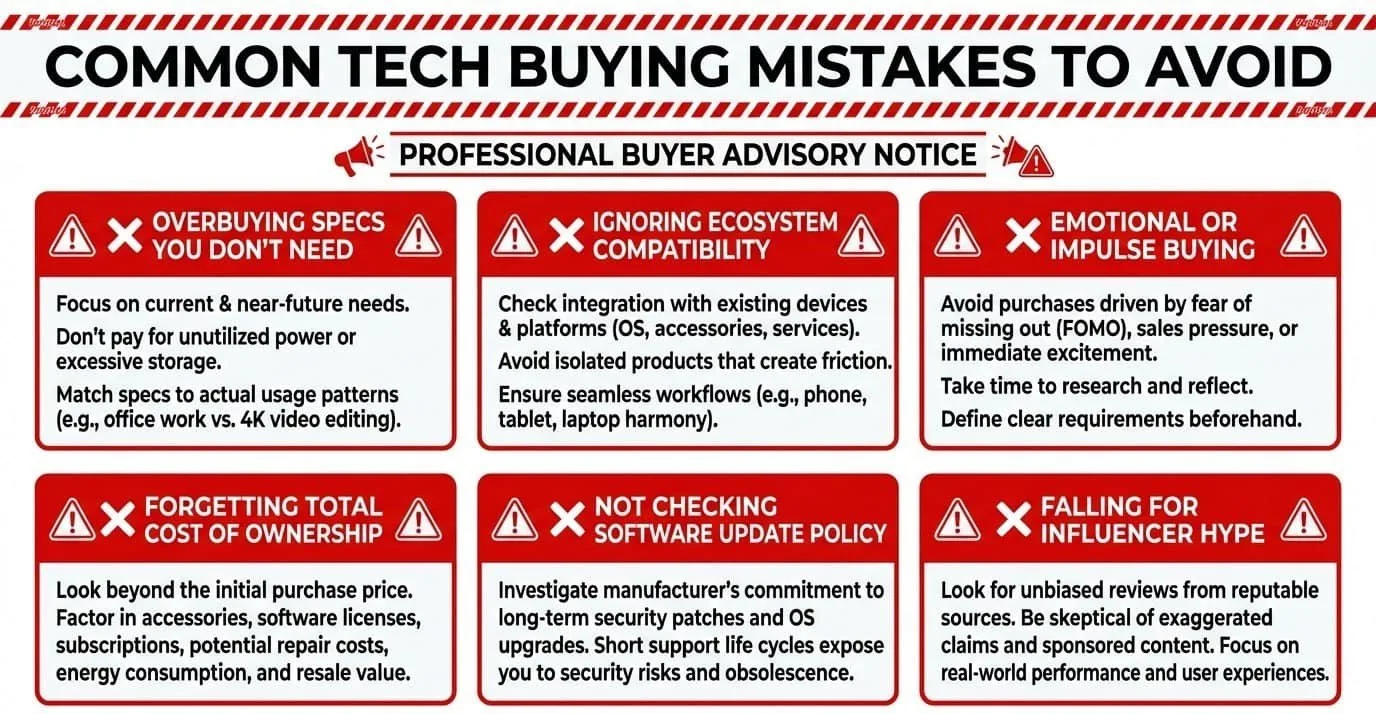
Even with research and comparison, many buyers still make predictable mistakes. These errors don’t happen because people lack intelligence — they happen because marketing, urgency, and information overload cloud judgment.
If you want to truly understand how to choose a tech product wisely, avoiding these common pitfalls is just as important as following the right steps.
- Overbuying Specs
One of the most common mistakes is buying more power than you actually need.
It’s easy to assume that higher RAM, faster processors, or the most premium configuration automatically mean a better purchase. But if your daily tasks involve browsing, streaming, email, and light productivity, you may never fully utilize high-end hardware.
Overbuying specs often results in:
- Paying significantly more upfront
- Reduced value for money
- Carrying unnecessary features
- Faster upgrade temptation when newer models appear
Performance should match your use case — not your fear of missing out.
2. Ignoring Ecosystem Compatibility
A device may look excellent on its own, but if it doesn’t integrate well with your existing setup, friction builds quickly.
Ignoring ecosystem compatibility can lead to:
- Sync issues between devices
- Limited accessory support
- Extra subscriptions
- Switching costs later
Before purchasing, always ask how the device fits into your current digital environment. Smooth integration often matters more than marginal performance differences.
3. Ignoring Total Cost of Ownership
Focusing only on the sticker price is a mistake.
Recurring subscriptions, accessories, repairs, upgrades, and extended warranties can significantly increase the total cost of ownership.
A device that seems affordable at checkout may become costly over time.
Before finalizing your purchase, calculate:
- Ongoing subscription fees
- Accessory requirements
- Repair likelihood
- Upgrade limitations
Looking at long-term value instead of short-term savings leads to smarter decisions.
4. Buying Without Checking Update Policy
Software support determines how long a device remains secure and compatible.
A device that stops receiving updates may:
- Lose access to newer apps
- Become vulnerable to security risks
- Experience performance issues
Before buying, check how long the manufacturer typically supports its products with software updates and security patches.
Longevity often depends more on software support than hardware capability.
5. Falling for Influencer Hype
Influencer reviews and tech content can be informative — but they are not always aligned with your specific needs.
Many influencers test products in ideal conditions or focus on niche use cases that may not apply to you.
Hype-driven buying often results in:
- Overpaying for premium features
- Buying for aesthetics instead of function
- Choosing trends over long-term usability
Always evaluate whether the product genuinely solves a problem in your daily life — not whether it looks impressive online.
We’ve covered these errors in more detail in our article on common mistakes when buying electronics, including how to prevent costly regret.
Quick Tech Buying Framework (7-Step Summary)
If the full guide above feels detailed, here’s a simplified version you can quickly follow anytime you’re evaluating a device.
- Define your real use case before comparing specs.
- Set a realistic budget and calculate long-term costs.
- Understand the core specifications that impact your performance.
- Compare products within the same price tier.
- Check compatibility with your existing ecosystem.
- Evaluate longevity, updates, and upgrade potential.
- Make the decision calmly — not emotionally.
This structured approach prevents impulse buying and keeps your decision aligned with purpose, practicality, and long-term value.
Final Thoughts – How to Choose a Tech Product
Choosing technology for your home office or remote work setup doesn’t have to feel overwhelming.
The confusion most buyers experience doesn’t come from a lack of intelligence — it comes from information overload, marketing pressure, and starting in the wrong place. When you begin with purpose instead of specifications, when you think about long-term value instead of short-term excitement, and when you evaluate compatibility instead of popularity, the entire decision process becomes clearer.
Learning how to choose a tech product is not about memorizing processor names or chasing the newest release. It’s about building a simple, repeatable framework:
- Define your real use case.
- Set a realistic budget and calculate total cost.
- Understand the specifications that actually matter.
- Compare products logically within the same tier.
- Check ecosystem compatibility.
- Evaluate longevity and support.
- Avoid emotional buying.
When you approach technology this way, you stop reacting to trends and start making intentional decisions.
The right device isn’t the most expensive one.
It isn’t the most popular one.
It’s the one that fits your needs, integrates smoothly into your life, and continues delivering value long after the excitement of unboxing fades.
If you follow this structured approach consistently, you’ll save time, protect your hard-earned money, and avoid the regret that so often follows impulse purchases.
Technology should simplify your life — not complicate it.
And when you choose with clarity, it will.
When you follow a structured technology purchasing strategy instead of reacting to trends, your decisions become calmer, smarter, and more cost-effective.
Whether you’re evaluating the best tech of the year, searching for best budget tech, or simply trying to avoid a costly mistake, following a structured framework makes every tech decision clearer and more confident.
Frequently Asked Questions (FAQs)
Is it better to buy premium or budget tech?
It depends on your workload and expectations. Budget devices work well for light tasks but may have limited durability or shorter update cycles. Premium devices offer stronger performance and build quality, but can be unnecessary if your needs are basic. For most users, mid-range options often provide the best balance between price and performance.
How much RAM do I really need?
For everyday tasks like browsing and streaming, 8GB is usually sufficient. For multitasking, creative work, or gaming, 16GB provides smoother performance. Heavy professional workloads may require 32GB or more. If you’re unsure, refer to a detailed breakdown of what RAM does and how much is appropriate for your usage.
How long should a tech product last?
A well-chosen device should remain reliable for at least 3–5 years, depending on the category. Longevity depends on build quality, upgrade potential, and software update support. Devices with longer update policies and durable components tend to provide better long-term value.
Is buying refurbished tech safe?
Yes — if purchased from certified or authorized sellers that offer warranty coverage and return policies. Refurbished devices can provide excellent value, especially if they are manufacturer-certified. Avoid unverified sellers with unclear warranty terms.
Should I upgrade my current device or buy a new one?
Before purchasing new tech, evaluate whether upgrading RAM, storage, or replacing the battery could extend your current device’s life. If performance limitations affect productivity or software support is ending, replacing the device may provide better long-term value.
If you found this guide helpful and it gave you clarity on how to choose the right tech product, consider subscribing to our email newsletter. We regularly share practical tech buying advice, simplified guides, and smart decision frameworks designed specifically for U.S. remote workers and home office professionals — without hype or unnecessary jargon.
Have a question, experience, or insight of your own? Drop your thoughts in the comments below. Your feedback not only helps others but also shapes the kind of in-depth, practical content we create next.
And if you think this article could help a friend, family member, or colleague avoid a costly tech mistake, share it with them. Smart decisions are always better when shared.

Md Afraz Alam is a digital marketing consultant, content strategist, and the founder behind Techfee and USA Tech Deals. Through USA Tech Deals, he shares research-driven home office technology guides, product comparisons, remote work setup tips, and practical tech buying insights designed to help U.S. professionals, freelancers, and remote workers make smarter technology decisions without overspending on the wrong products.