Buying a new gadget should feel exciting — but for many people, it ends in regret.
You compare specifications for hours, watch YouTube reviews, scroll through discounts, and finally click “Buy Now.” A few days later, doubt creeps in. The laptop feels slower than expected. The battery drains too quickly. The monitor doesn’t fit your desk. Or worse — you realize you overspent on features you don’t even use.
These common mistakes when buying electronics happen more often than people admit. Impulse decisions, confusion over specifications, marketing hype, and fear of missing out during sales push buyers into choices that don’t align with their real needs.
If you’ve ever wondered how to choose a tech product without second-guessing yourself later, this guide will help. It explains the most common tech buying mistakes and shows you how to avoid them using a structured decision framework — similar to the approach outlined in our checklist before buying electronics.
By the end of this article, you’ll know exactly what to avoid, what to prioritize, and how to make smarter, regret-free tech purchases — whether you’re buying for everyday use or upgrading your home office setup.
Why People Regret Tech Purchases
Before we break down the specific mistakes, it’s important to understand why regret happens in the first place.
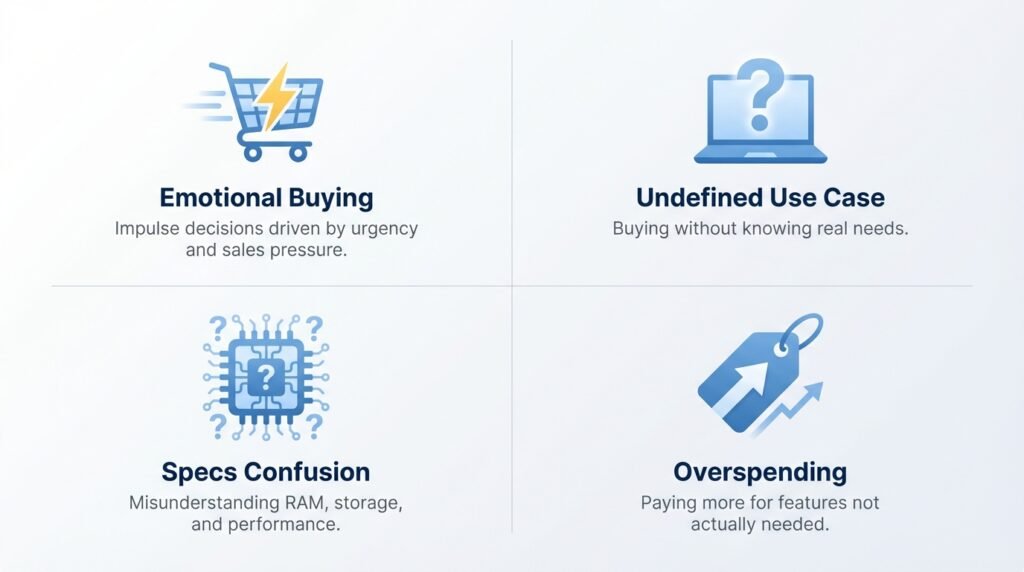
1. Emotional Buying
Flash sales, countdown timers, influencer hype, and “limited stock” alerts trigger urgency. Instead of evaluating the product logically, buyers react emotionally. That emotional decision often conflicts with long-term satisfaction.
2. Undefined Use Case
Many people buy electronics without clearly defining their purpose. A laptop for casual browsing requires very different specifications than one for video editing or remote work.
Without clarity, even a powerful device can feel like the wrong choice.
3. Specifications Confusion
Terms like GHz, DDR5, NVMe, refresh rate, and Wi-Fi 6E sound impressive — but most buyers don’t fully understand what they mean. This leads to overpaying for unnecessary specs or underestimating critical ones.
4. Overspending for “Future Proofing”
Buying the most expensive model “just in case” often results in wasted money. On the flip side, choosing the cheapest option without evaluating value can cause long-term frustration.
If you want a structured framework to prevent these regrets, start with our complete guide on how to choose a tech product, then use this article as your mistake-avoidance layer. Pairing it with a proper checklist before buying electronics ensures you make informed decisions every time.
15 Common Mistakes When Buying Electronics
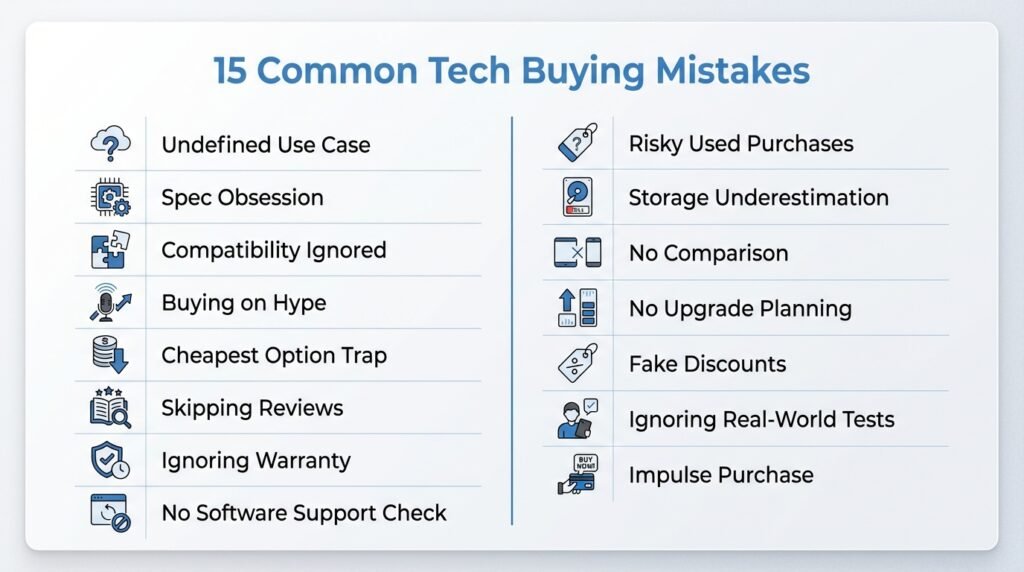
After analyzing user discussions, product reviews, refund patterns, and real buyer feedback across forums and tech communities, one thing becomes clear: most regret doesn’t happen because the product was “bad.” It happens because the buying decision was rushed, unclear, or emotionally driven.
I’ve reviewed common complaints, long-term user experiences, and typical buyer frustrations — and the same patterns appear repeatedly. That’s why I’ve compiled these 15 most common tech buying mistakes, so you can avoid the same traps and make smarter, more confident decisions.
Below are the most common tech buying mistakes — and how to avoid them.
#Mistake 1: Not Defining Your Use Case Clearly
This mistake happens when someone buys a device without clearly identifying what they actually need it for. Instead of aligning the product with a specific purpose, the decision is made based on general assumptions like “this looks powerful” or “this is popular.”
In simple terms, this is a clarity mistake. When your purpose isn’t defined, your decision becomes random.
Why it happens:
Most buyers assume that higher specifications automatically guarantee satisfaction. Marketing language like “high performance” or “professional-grade” makes devices appear universally suitable — even when they are not.
Real-world example:
Someone working remotely buys a gaming laptop because it has high specs — only to realize later that it’s heavy, noisy, and has poor battery life for daily office work. On the other hand, another person buys a basic laptop for video editing and struggles with lag and overheating.
How to avoid it:
Before comparing products, clearly define your use case in writing. Ask yourself:
- Is this for remote work?
- Is this for gaming?
- Is this for creative editing?
- Is this for casual browsing?
Your use case determines everything — budget, performance requirements, and long-term satisfaction.
#Mistake 2: Focusing Only on Specifications
This mistake occurs when buyers concentrate entirely on technical numbers — RAM size, processor speed, refresh rate, storage capacity — without understanding how those specifications actually impact their daily usage. Instead of evaluating practical needs, the decision becomes a race for bigger numbers.
In simple terms, this is a “numbers over needs” mistake. Specifications are important, but without context, they can mislead you into overspending or underbuying.
Why it happens:
Technology marketing heavily promotes numbers. Terms like “16GB RAM,” “4K display,” “120Hz refresh rate,” or “Octa-core processor” sound powerful and impressive. Many buyers assume that higher numbers automatically mean better performance for everyone.
At the same time, technical jargon can confuse first-time buyers. Without clarity, people either overpay for features they don’t use or choose insufficient specs because they underestimate their workload.
Real-world example:
A remote worker buys a laptop with 32GB RAM for simple email, browsing, and document work — spending far more than necessary. Meanwhile, another buyer chooses a 4GB RAM laptop for multitasking and video calls, only to experience daily slowdowns and frustration.
Both decisions stem from misunderstanding specifications.
How to avoid it:
Instead of asking, “What has the highest specs?” ask, “What specs match my use case?”
For most users:
- 8GB RAM is suitable for basic browsing and light tasks.
- 16GB RAM is ideal for multitasking, remote work, and productivity.
- 32GB+ RAM is typically needed for heavy creative or technical workloads.
Focus on relevance, not raw numbers. Specifications should support your workflow — not inflate your budget.
#Mistake 3: Ignoring Compatibility Issues
This mistake happens when buyers assume that all devices and accessories will automatically work together without verifying compatibility. Instead of checking ports, operating systems, software requirements, or ecosystem integration, the purchase is made with blind confidence.
In simple terms, this is a “just assume it works” mistake — and it often leads to immediate frustration after unboxing.
Why it happens:
Modern tech marketing emphasizes convenience and plug-and-play simplicity. Many buyers assume universal compatibility because most products appear standardized. However, differences in operating systems, connection ports, wireless standards, and ecosystem restrictions can create serious limitations.
Another reason is oversight. Buyers focus heavily on performance specs but overlook technical compatibility details.
Real-world example:
Someone purchases a new monitor for their laptop but later realizes the laptop doesn’t support the required display output. Or a user buys accessories designed primarily for Apple devices while using Windows — resulting in limited functionality.
In home office setups, this mistake can disrupt productivity instantly.
How to avoid it:
Before buying any gadget, verify:
- Port compatibility (HDMI, USB-C, Thunderbolt, etc.)
- Operating system support (Windows, macOS, Android, iOS)
- Wireless standards (Wi-Fi version, Bluetooth compatibility)
- Ecosystem limitations (Apple vs Android integrations)
Compatibility checks take only a few minutes — but they prevent long-term inconvenience and additional expenses.
#Mistake 4: Buying Based on Hype
This mistake occurs when purchasing decisions are driven by trends, influencer endorsements, viral marketing, or social pressure rather than actual need. The excitement around a new release overshadows practical evaluation.
In simple terms, this is an “emotional urgency” mistake — where popularity replaces logic.
Why it happens:
Tech launches are designed to create excitement. Countdown events, limited editions, flashy new features, and social media buzz create fear of missing out (FOMO). Buyers feel that if everyone is upgrading, they should too.
Marketing often highlights one standout feature while downplaying trade-offs.
Real-world example:
A buyer upgrades to the latest smartphone mainly because of a new camera feature — even though they rarely take professional photos. Meanwhile, their previous device was functioning perfectly fine.
The result? Overspending with minimal real benefit.
How to avoid it:
Before purchasing, ask yourself:
- Does this feature genuinely improve my daily workflow?
- Would I notice a meaningful difference?
- Am I upgrading out of need or excitement?
Take a short pause before deciding. Hype fades quickly — but financial regret lasts longer.
#Mistake 5: Choosing the Cheapest Option Without Evaluating Value
This mistake happens when price becomes the only deciding factor. Buyers assume that saving money upfront is always the smartest move, without considering durability, performance, or long-term reliability.
In simple terms, this is a “short-term savings” mistake that often leads to long-term dissatisfaction.
Why it happens:
Budget constraints naturally push buyers toward lower prices. Sales banners, discount tags, and “best budget option” labels reinforce the idea that cheaper is smarter.
However, low price does not always equal good value.
Real-world example:
Someone buys a low-cost Wi-Fi router for a larger home office. The result? Weak coverage, unstable video calls, and constant buffering — leading to eventual replacement within months.
The initial savings disappear.
How to avoid it:
Instead of focusing only on price, evaluate:
- Build quality
- Warranty and support
- Performance consistency
- Longevity
- Upgrade flexibility
A slightly higher-priced device that lasts longer often provides better overall value than the cheapest alternative.
#Mistake 6: Skipping Long-Term Reviews
This mistake occurs when buyers rely only on first impressions, launch-day reviews, or promotional content instead of checking real long-term user experiences.
In simple terms, this is a “short-term evaluation” mistake — judging a product too quickly without understanding how it performs over time.
Why it happens:
When researching a gadget, most people read the top reviews or watch quick YouTube summaries. These often focus on unboxing experience, design, and early performance — not durability.
Buyers also feel pressure to purchase quickly during sales, leaving little time for deeper research.
Real-world example:
A laptop receives glowing early reviews for speed and design. Six months later, users begin reporting overheating issues and battery degradation. Unfortunately, the buyer only saw the early excitement — not the long-term feedback.
How to avoid it:
Look for reviews that mention:
- 3–6 months of usage
- Battery performance over time
- Heating or durability concerns
- Customer service experiences
Patterns matter more than isolated positive comments.
#Mistake 7: Ignoring Warranty and Return Policies
This mistake happens when buyers overlook after-sales protection because they are focused entirely on features and price.
In simple terms, this is a “protection blind spot” mistake — assuming nothing will go wrong.
Why it happens:
During the excitement of buying, warranty details feel secondary. Many assume all electronics come with standard coverage and flexible returns — which is not always true.
Some online sellers also make return policies less visible.
Real-world example:
A buyer discovers a manufacturing defect after a week — only to find the return window was just 48 hours, or the warranty excludes key components like the battery.
This creates frustration and financial loss.
How to avoid it:
Before purchasing, verify:
- Warranty duration
- What components are covered
- Service center availability
- Clear return and exchange policies
Good warranty support reflects brand confidence and protects your investment.
#Mistake 8: Overlooking Software Updates and Security Support
This mistake occurs when buyers focus entirely on hardware and ignore long-term software support.
In simple terms, this is a “future neglect” mistake — assuming today’s performance guarantees tomorrow’s reliability.
Why it happens:
Specifications are visible and easy to compare. Software update policies are often hidden in fine print or rarely discussed in advertisements.
Buyers assume that updates will continue indefinitely.
Real-world example:
A smartphone performs well initially but stops receiving security updates within two years. Over time, apps become incompatible, and vulnerabilities increase.
The hardware may still work — but the software support ends its usability.
How to avoid it:
Research:
- How long the brand provides OS updates
- Frequency of security patches
- Brand history of update reliability
Software longevity directly impacts performance and safety.
#Mistake 9: Buying Used Electronics Without Proper Checks
This mistake happens when buyers prioritize lower prices without verifying the condition or credibility of the device.
In simple terms, this is a “discount temptation” mistake.
Why it happens:
Refurbished or used electronics often appear significantly cheaper, making them attractive. Buyers assume all refurbished devices are equally reliable.
However, not all sellers provide certified refurbishment.
Real-world example:
A buyer purchases a used laptop online. The device works initially, but the battery health is severely degraded, and there is no warranty coverage.
Savings turn into unexpected repair costs.
How to avoid it:
When buying used electronics:
- Check battery health
- Verify warranty coverage
- Buy from certified sellers
- Confirm return policy
- Inspect physical condition carefully
Buying used can be smart — but only with proper checks.
#Mistake 10: Underestimating Storage Needs
This mistake occurs when buyers assume minimal storage will be sufficient long-term.
In simple terms, this is a “capacity underestimation” mistake.
Why it happens:
Storage upgrades increase price, so buyers choose the smallest option to save money. They underestimate OS updates, software installations, and media storage growth.
Real-world example:
A laptop with 256GB storage seems enough at first. Within months, system updates and files consume most of the space, causing slow performance and constant storage warnings.
How to avoid it:
Consider:
- Operating system space usage
- Application sizes
- Media files and downloads
- Future expansion needs
When uncertain, slightly higher storage is often the safer decision.
#Mistake 11: Not Comparing Alternatives
This mistake happens when buyers settle for the first product that seems “good enough.”
In simple terms, this is a “lazy comparison” mistake.
Why it happens:
Research feels overwhelming. After finding one acceptable option, buyers stop looking further.
Sales urgency also reduces comparison time.
Real-world example:
A buyer purchases a laptop after viewing only one model. Later, they discover a similar model with better battery life and warranty at nearly the same price.
How to avoid it:
Always compare at least two or three alternatives. Evaluate:
- Core performance
- Build quality
- Price
- Warranty
- Reviews
Comparison reveals trade-offs clearly.
#Mistake 12: Ignoring Future Upgrade Potential
This mistake occurs when buyers focus only on present needs and ignore long-term flexibility.
In simple terms, this is a “short-sighted decision” mistake.
Why it happens:
Upgradability isn’t always clearly mentioned. Buyers assume all devices allow upgrades.
However, many modern laptops have soldered RAM or limited expansion options.
Real-world example:
A user buys a laptop with non-upgradable 8GB RAM. As workload increases, performance declines — but upgrading isn’t possible.
How to avoid it:
Before buying, check:
- RAM upgrade capability
- Storage expansion options
- Component accessibility
Future-proofing doesn’t mean overspending — it means maintaining flexibility.
#Mistake 13: Falling for Fake Discounts
This mistake happens when buyers assume advertised discounts represent real savings.
In simple terms, this is a “pricing illusion” mistake.
Why it happens:
Retailers sometimes inflate original prices before applying discounts. Countdown timers and “limited stock” messaging create urgency.
Real-world example:
A gadget marked “50% OFF” appears irresistible — but historical pricing shows it regularly sells at the discounted price.
How to avoid it:
Check price history using reliable tracking tools. Evaluate whether the product meets your checklist criteria — not just whether it’s on sale.
#Mistake 14: Not Checking Real-World Performance Tests
This mistake occurs when buyers rely solely on manufacturer claims.
In simple terms, this is a “marketing trust” mistake.
Why it happens:
Product pages highlight ideal conditions. Battery life, performance speed, and durability claims often reflect controlled environments.
Real-world example:
A laptop claims 12 hours of battery life — but real users report 6–7 hours during multitasking and video calls.
How to avoid it:
Look for independent benchmarks, real-world testing reviews, and long-term performance data.
Independent evidence is more reliable than promotional claims.
#Mistake 15: Buying Without a Decision Pause
This mistake happens when buyers finalize purchases immediately without reflection.
In simple terms, this is an “impulse commitment” mistake.
Why it happens:
Flash sales, limited-time offers, and emotional excitement create pressure to act quickly.
Buyers fear missing out.
Real-world example:
Someone purchases a gadget late at night during a flash sale — only to regret it the next morning after reconsidering.
How to avoid it:
Unless urgent, take a 24-hour pause. Revisit:
- Your use case
- Your budget
- Alternative options
Clarity improves decision quality.
What You Should Consider Before Purchasing Any Electronic Device
If you want to avoid these common mistakes when buying electronics, focus on five core factors:
| Factor | Why It Matters | Risk If Ignored |
|---|---|---|
| Use Case | Aligns performance | Overspending |
| Specs | Matches workload | Lag / Waste |
| Compatibility | Prevents conflicts | Extra costs |
| Support | Longevity | Early replacement |
| Value | Smart investment | Regret |
- Use Case – What will you actually use it for?
- Core Specifications – CPU, RAM, storage, refresh rate, etc.
- Compatibility – Does it fit your ecosystem and existing setup?
- Long-Term Support – Updates, warranty, service availability.
- Value vs Price – Is it worth the money long-term?
These five factors align directly with a structured framework on how to choose a tech product intelligently.
Mistakes When Buying Electronics for Home Office
When buying electronics for a home office setup, mistakes can directly affect productivity.
Common home office errors include:
- Buying an underpowered laptop for remote work
- Choosing the wrong monitor size or resolution
- Ignoring ergonomic accessories
- Overpaying for gaming-level specs when unnecessary
- Selecting a weak router that disrupts video meetings
Your home office equipment should support comfort, performance, and reliability — not create daily frustration.
Quick Tips on Buying Electronics Smartly
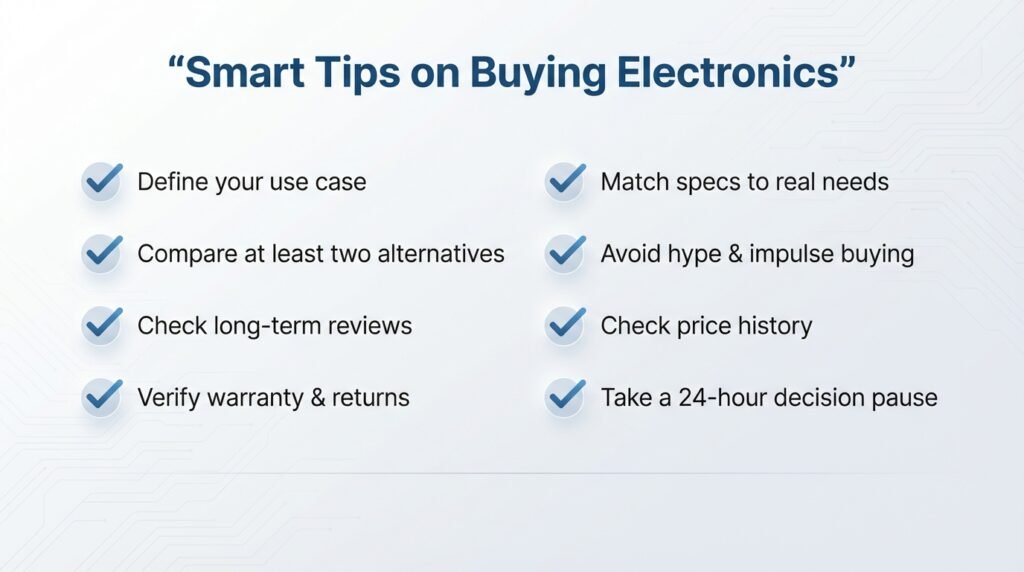
If you’re looking for practical tips on buying electronics, remember:
- Define your use case before browsing
- Compare at least two alternatives
- Check long-term reviews
- Verify warranty and return policies
- Match specs to real needs
- Avoid impulse decisions
- Don’t fall for hype
- Take a decision pause
Simple discipline prevents expensive regret.
Conclusion: Common Mistakes When Buying Electronics
Most regret doesn’t come from buying technology — it comes from buying without a structured process.
By understanding these common mistakes when buying electronics, you protect your money, avoid frustration, and make confident decisions.
If you want a complete structured decision framework, read our guide on how to choose a tech product, and combine it with a proper checklist before buying electronics before your next purchase.
Smart buying isn’t about knowing everything. It’s about avoiding the wrong moves.
Frequently Asked Questions
What are the most common electronics failures?
Battery degradation, overheating, storage failure, motherboard damage, and software instability are among the most common failures.
What to look out for when buying used electronics?
Check battery health, warranty coverage, physical damage, seller credibility, and return policy.
How many GB of RAM is good for a laptop?
8GB works for basic tasks, 16GB is ideal for multitasking and remote work, and 32GB+ suits heavy creative or gaming use.
What is the biggest enemy of electronics?
Heat is the biggest enemy. Dust, poor ventilation, and power surges also shorten device lifespan.
What are 5 things to consider when buying a computer?
Use case, specifications, compatibility, long-term support, and overall value.
If you found this guide helpful, don’t let these mistakes cost you money again. Subscribe to our email newsletter for practical, no-hype tech buying advice, smart checklists, and home office tech insights delivered straight to your inbox. And before you leave, drop a comment below — which mistake have you made in the past, or which one are you trying to avoid right now? Your experience might help someone else make a smarter decision.

𝐈’𝐦 𝐒𝐭𝐞𝐯𝐞 𝐇𝐨𝐮𝐠𝐚𝐧, the writer and researcher 𝐛𝐞𝐡𝐢𝐧𝐝 𝐔𝐒𝐀 𝐓𝐞𝐜𝐡 𝐃𝐞𝐚𝐥𝐬.
I help everyday users understand technology—𝐰𝐡𝐞𝐭𝐡𝐞𝐫 𝐢𝐭’𝐬 𝐜𝐡𝐨𝐨𝐬𝐢𝐧𝐠 𝐭𝐡𝐞 𝐫𝐢𝐠𝐡𝐭 𝐝𝐞𝐯𝐢𝐜𝐞, 𝐝𝐢𝐚𝐠𝐧𝐨𝐬𝐢𝐧𝐠 𝐩𝐞𝐫𝐟𝐨𝐫𝐦𝐚𝐧𝐜𝐞 𝐢𝐬𝐬𝐮𝐞𝐬, 𝐬𝐞𝐭𝐭𝐢𝐧𝐠 𝐮𝐩 𝐡𝐨𝐦𝐞-𝐨𝐟𝐟𝐢𝐜𝐞 𝐞𝐪𝐮𝐢𝐩𝐦𝐞𝐧𝐭, 𝐨𝐫 𝐬𝐨𝐥𝐯𝐢𝐧𝐠 𝐜𝐨𝐦𝐦𝐨𝐧 𝐭𝐞𝐜𝐡 𝐩𝐫𝐨𝐛𝐥𝐞𝐦𝐬.
My content blends deep research, expert-backed insights, and real user feedback to bring you clear, practical, and easy-to-follow guidance. 𝐈 𝐚𝐧𝐚𝐥𝐲𝐳𝐞 𝐩𝐫𝐨𝐝𝐮𝐜𝐭𝐬, 𝐜𝐨𝐦𝐩𝐚𝐫𝐞 𝐟𝐞𝐚𝐭𝐮𝐫𝐞𝐬, 𝐬𝐭𝐮𝐝𝐲 𝐭𝐞𝐜𝐡𝐧𝐢𝐜𝐚𝐥 𝐬𝐩𝐞𝐜𝐢𝐟𝐢𝐜𝐚𝐭𝐢𝐨𝐧𝐬, 𝐞𝐱𝐩𝐥𝐨𝐫𝐞 𝐭𝐫𝐨𝐮𝐛𝐥𝐞𝐬𝐡𝐨𝐨𝐭𝐢𝐧𝐠 𝐦𝐞𝐭𝐡𝐨𝐝𝐬, 𝐚𝐧𝐝 𝐛𝐫𝐞𝐚𝐤 𝐝𝐨𝐰𝐧 𝐜𝐨𝐦𝐩𝐥𝐞𝐱 𝐭𝐞𝐜𝐡 𝐭𝐨𝐩𝐢𝐜𝐬 𝐢𝐧𝐭𝐨 𝐬𝐢𝐦𝐩𝐥𝐞, 𝐚𝐜𝐭𝐢𝐨𝐧𝐚𝐛𝐥𝐞 𝐬𝐭𝐞𝐩𝐬.
𝐇𝐞𝐫𝐞 𝐨𝐧 𝐔𝐒𝐀 𝐓𝐞𝐜𝐡 𝐃𝐞𝐚𝐥𝐬, 𝐲𝐨𝐮’𝐥𝐥 𝐟𝐢𝐧𝐝:
Tech buying guides based on verified data and side-by-side comparisons
Product insights that highlight pros, cons, and real-world use cases
Step-by-step tutorials for fixing, optimizing, and understanding devices
Home-office and productivity setup advice
Educational articles that simplify complicated tech concepts
Video explanations featuring me as your on-screen tech guide
𝐌𝐲 𝐦𝐢𝐬𝐬𝐢𝐨𝐧 𝐢𝐬 𝐭𝐨 𝐡𝐞𝐥𝐩 𝐲𝐨𝐮 𝐦𝐚𝐤𝐞 𝐬𝐦𝐚𝐫𝐭𝐞𝐫 𝐝𝐞𝐜𝐢𝐬𝐢𝐨𝐧𝐬, 𝐚𝐯𝐨𝐢𝐝 𝐦𝐢𝐬𝐭𝐚𝐤𝐞𝐬, 𝐬𝐨𝐥𝐯𝐞 𝐩𝐫𝐨𝐛𝐥𝐞𝐦𝐬 𝐟𝐚𝐬𝐭𝐞𝐫, 𝐚𝐧𝐝 𝐠𝐞𝐭 𝐭𝐡𝐞 𝐦𝐨𝐬𝐭 𝐨𝐮𝐭 𝐨𝐟 𝐲𝐨𝐮𝐫 𝐝𝐞𝐯𝐢𝐜𝐞𝐬—𝐰𝐢𝐭𝐡𝐨𝐮𝐭 𝐜𝐨𝐧𝐟𝐮𝐬𝐢𝐨𝐧 𝐨𝐫 𝐨𝐯𝐞𝐫𝐰𝐡𝐞𝐥𝐦.
Stay connected for helpful guides, latest tech insights, and smart recommendations.
Follow us on: YouTube • Instagram • Facebook • X (Twitter) • LinkedIn • Pinterest • TikTok