

For years, buying a MacBook usually meant spending close to $1,000 or more, which made Apple laptops feel out of reach for many students, casual users, and first-time Mac buyers. But that narrative has started to change with the arrival of the Apple MacBook Neo—a brand-new entry-level laptop designed to bring the Mac experience to a much wider audience.
With a starting price of $599, colorful new design options, and a modern processor built for AI-powered tasks, the MacBook Neo has quickly become one of the most talked-about laptops of the year. From social media discussions to trending search queries online, curiosity around this device has exploded as people wonder whether Apple has finally created the perfect budget Mac.
What makes the MacBook Neo especially interesting isn’t just its price. Apple has combined a 13-inch Liquid Retina display, the A18 Pro chip, up to 16 hours of battery life, and a lightweight aluminum design into a laptop that still carries the premium feel the company is known for.
At the same time, the colorful finishes—such as Blush, Citrus, Indigo, and classic Silver—add a playful personality that stands out from traditional MacBook designs. This approach signals Apple’s intention to attract new users, particularly students, everyday users, and iPhone owners who may be buying their first Mac.
For many buyers, the MacBook Neo could become an appealing option for everyday productivity—whether it’s attending online classes, managing emails, browsing the web, working on spreadsheets, or even setting up a simple home office workstation.
Also, potential buyers naturally have many questions.
- How powerful is the A18 Pro chip compared with other Mac processors?
- Is the MacBook Neo price truly a good deal compared with other Apple laptops?
- And how does it stack up against models like the MacBook Air or MacBook Pro?
This comprehensive guide will walk you through everything you need to know about the Apple MacBook Neo, including its price, release date, specifications, performance, colors, and real-world usability.
We’ll also explore who this laptop is best suited for—whether you’re a student, a remote worker, or someone upgrading from a budget Windows PC or Chromebook.
By the end of this guide, you’ll have a clear understanding of whether the MacBook Neo is the right choice for your needs—or if another Mac might be a better fit.
What Is Apple MacBook Neo?

The Apple MacBook Neo is Apple’s newest entry-level Mac laptop, designed to bring the Mac experience to a broader audience at a much more affordable price point.
For many years, most MacBooks typically started around the $999 range, making them a premium choice compared with many Windows laptops and Chromebooks.
With the introduction of the MacBook Neo starting at $599, Apple is taking a significant step toward making its ecosystem more accessible to students, first-time laptop buyers, and everyday users who may not have previously considered buying a Mac.
At its core, the MacBook Neo is built around the idea of delivering the essential Mac experience at a lower cost, while still maintaining Apple’s signature design quality and performance reliability.
It features a durable aluminum body, a vibrant 13-inch Liquid Retina display, and the A18 Pro chip, which allows the device to handle everyday tasks such as web browsing, video calls, document editing, and media consumption smoothly.
The laptop also integrates tightly with the Apple ecosystem, allowing users to seamlessly connect with their iPhone, share files through AirDrop, or continue tasks across devices using features like Handoff and Universal Clipboard.
Apple has positioned the MacBook Neo as a practical and approachable device for a wide range of users. Students can use it for taking notes, attending online classes, and creating presentations.
Professionals working remotely can rely on it for email, meetings, and productivity apps. Even casual users who simply want a reliable laptop for browsing the web, streaming content, or managing daily tasks can benefit from its balance of performance and portability.
The launch of the MacBook Neo also reflects Apple’s broader strategy to expand the Mac user base. By offering a MacBook at a lower starting price than ever before, Apple aims to attract new customers who currently rely on budget laptops, Chromebooks, or older computers. This move makes the Mac platform more accessible while still delivering the premium experience people expect from Apple products.
In simple terms, the MacBook Neo represents Apple’s effort to bridge the gap between affordability and the traditional Mac experience—making it easier than ever for students, new users, and everyday consumers to enter the Mac ecosystem without spending close to a thousand dollars on their first Apple laptop.
MacBook Neo Release Date
The MacBook Neo release date has generated a lot of interest since the device was introduced as Apple’s most affordable Mac laptop to date.
Apple officially unveiled the MacBook Neo in March 2026, positioning it as a new entry-level option designed for students, everyday users, and people entering the Mac ecosystem for the first time. The announcement quickly caught the attention of tech enthusiasts and potential buyers because it marked one of the rare occasions when Apple launched a MacBook significantly below its traditional pricing range.
Following the announcement, Apple opened pre-orders in early March 2026, allowing customers to reserve the laptop ahead of its official launch. According to product listings and retailer information, the device began appearing on online stores and Apple’s official product pages around the first week of March 2026, signaling that shipments would soon begin.
The official availability date for the Apple MacBook Neo is March 11, 2026. Starting on this date, customers can purchase the laptop through Apple’s online store, Apple retail locations, and selected authorized retailers. Buyers who placed early pre-orders are expected to receive their devices around the same time that the product becomes widely available in stores.
This timeline answers common questions such as “When does MacBook Neo come out?” or “What is the MacBook Neo release date?” In simple terms, Apple introduced the device in March 2026, opened pre-orders shortly after the announcement, and began official sales and availability on March 11, 2026. The launch represents a notable moment for Apple’s laptop lineup, as the MacBook Neo introduces a more affordable entry point for users interested in owning a Mac.
MacBook Neo Price
The Apple MacBook Neo price starts at around $599 for the base configuration. This entry-level model typically includes 8GB of unified memory and 256GB of SSD storage, providing enough performance for everyday computing tasks such as web browsing, video calls, document editing, and media streaming.
For users who need more storage or additional features, Apple also offers an upgraded configuration priced at around $699. This higher-tier version generally includes larger storage capacity and features like Touch ID, allowing users to unlock the device, authorize payments, and sign in to apps using their fingerprint.
Students and educators may also benefit from Apple’s education pricing, which can reduce the cost of the MacBook Neo by approximately $100 depending on the configuration and eligibility. This makes the laptop an appealing option for students who need a reliable device for coursework, research, presentations, and online learning.
In simple terms, if you are wondering “how much is the MacBook Neo?”, the answer depends on the model you choose. The laptop starts at about $599 for the base model, while upgraded configurations can reach around $699, with additional savings available through student and education discounts.
MacBook Neo Specifications
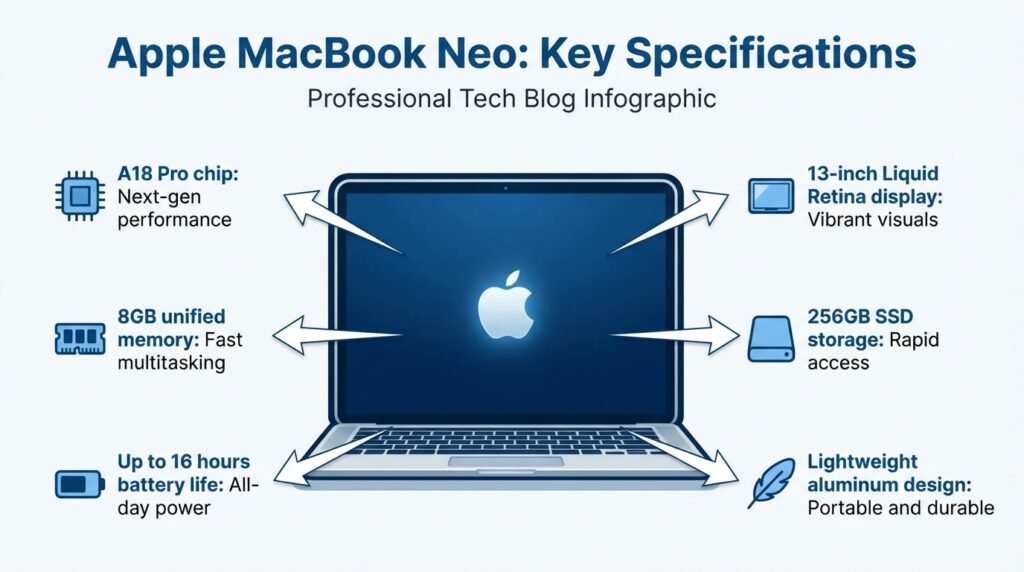
For many buyers, understanding the MacBook Neo specifications is one of the most important steps before deciding whether the device is worth upgrading to or purchasing for the first time.
A clear breakdown of the hardware helps users compare it with older MacBook models or other laptops in a similar price range. The MacBook Neo focuses on delivering balanced performance for everyday tasks while maintaining Apple’s signature build quality and efficiency.
At the heart of the laptop is the Apple A18 Pro chip, which is designed to handle common productivity workloads, multitasking, and AI-powered features built into modern macOS applications. Combined with unified memory and fast SSD storage, the device is capable of smoothly running everyday apps such as web browsers, office software, video calls, and media streaming.
Below is a quick overview of the MacBook Neo specs so you can easily understand its core hardware configuration.
| Feature | MacBook Neo Specification |
|---|---|
| Processor (Chip) | Apple A18 Pro chip |
| CPU Configuration | 6-core CPU (2 performance cores + 4 efficiency cores) |
| GPU | 5-core integrated GPU |
| Neural Engine | 16-core Neural Engine for AI tasks |
| RAM | 8GB Unified Memory |
| Storage | 256GB SSD (base model) |
| Display | 13-inch Liquid Retina display |
| Resolution | 2408 × 1506 pixels |
| Brightness | Up to 500 nits |
| Battery Life | Up to 16 hours of video playback |
| Ports | USB-C (USB 3), USB-C (USB 2), 3.5 mm headphone jack |
| External Display Support | Up to one 4K display at 60Hz |
| Camera | 1080p FaceTime HD camera |
| Audio | Dual speakers with Spatial Audio and Dolby Atmos |
| Weight | Approximately 2.7 pounds (1.23 kg) |
| Operating System | macOS |
These specifications show that the MacBook Neo is optimized for everyday productivity, portability, and efficiency rather than heavy professional workloads. The combination of the A18 Pro chip, unified memory, and SSD storage allows the laptop to handle tasks like browsing, document editing, streaming, online meetings, and light creative work smoothly.
For users searching for MacBook Neo specs, MacBook Neo chip details, RAM size, or storage configuration, the table above provides a quick and accurate overview of what the device offers.
If you’re curious about how memory affects a device’s performance, multitasking ability, and overall speed, you may also want to read our detailed guide on what RAM is in a computer and why it plays such an important role in modern devices.
MacBook Neo Design and Colors
The Apple MacBook Neo stands out not only for its pricing and performance but also for its refreshing design approach. Apple has focused on creating a laptop that feels modern, durable, and visually appealing while still maintaining the premium craftsmanship the MacBook lineup is known for.
The device features a solid aluminum body, which gives it a sturdy and high-quality feel despite being positioned as an entry-level Mac. This aluminum construction also helps the laptop remain lightweight and portable, making it easy to carry between classes, offices, or different workspaces at home.
Another important part of the MacBook Neo’s design philosophy is portability. Weighing roughly 2.7 pounds, the laptop is designed to be a constant companion for everyday users. Its slim profile and balanced build make it comfortable to carry in a backpack or laptop sleeve, whether you are heading to a classroom, a café, or setting up a small home office workspace.
One of the most eye-catching aspects of the MacBook Neo is Apple’s decision to introduce a colorful MacBook lineup. Unlike many traditional laptops that come only in neutral shades, this model offers several vibrant finishes that allow users to express their personal style. Each color option also includes a matching keyboard, giving the device a cohesive and distinctive appearance.
The MacBook Neo is available in four color options:
- Silver – a classic MacBook finish for users who prefer a traditional and professional look
- Blush – a soft pink tone that adds a stylish and modern touch
- Citrus – a bright yellow-inspired finish that gives the laptop a lively personality
- Indigo – a deep blue color that offers a bold yet elegant appearance
These colors are a major reason why the device is drawing attention online, with many users specifically searching for terms like MacBook Neo colors, pink MacBook Neo, or the vibrant MacBook Neo citrus color.
By combining a durable aluminum design with playful color choices, Apple has created a laptop that feels both premium and expressive, appealing especially to students, creative users, and anyone looking for something different from the usual laptop designs.
📩 Enjoying this guide?
Subscribe to our newsletter to receive the latest tech buying guides, product comparisons, and smart tech tips, toolkit directly in your inbox.
MacBook Neo Display, Camera, and Audio
When choosing a laptop, the quality of the display, camera, and audio system plays a big role in the overall experience—especially for people who spend hours reading, attending video calls, streaming content, or working online. The MacBook Neo is designed to deliver a balanced multimedia experience so that everyday tasks feel comfortable and visually engaging.
Display
The MacBook Neo features a 13-inch Liquid Retina display, which offers sharp visuals and vibrant colors for daily use. With a 2408 × 1506 resolution, the screen delivers crisp text and detailed images, making it easier to read documents, browse websites, edit presentations, or watch videos without straining your eyes.
The display also reaches up to 500 nits of brightness, which helps keep the screen clear and visible even in well-lit environments such as classrooms, offices, or near windows. Whether you are reading emails, editing spreadsheets, or streaming movies, the display is designed to provide a comfortable viewing experience with rich contrast and clear detail.
Camera
For video calls and online meetings, the MacBook Neo includes a 1080p FaceTime HD camera positioned above the display. This higher-resolution camera helps produce clearer and more natural-looking video during calls compared with older laptop webcams.
Whether you are attending virtual classes, joining work meetings, or catching up with friends and family through FaceTime, the camera is designed to keep your image sharp and well balanced in most lighting conditions.
Audio
Apple has also focused on improving the listening and communication experience with the MacBook Neo’s built-in audio system. The laptop features dual side-firing speakers that deliver clear sound with good depth for music, movies, and video calls.
Support for Spatial Audio and Dolby Atmos helps create a more immersive sound experience, especially when watching movies or listening to compatible content. Instead of feeling flat, the audio can feel more dynamic and surrounding.
To ensure your voice is heard clearly during calls, the MacBook Neo also includes a dual-microphone array with beamforming technology. These microphones are designed to focus on your voice while reducing background noise, which helps improve clarity during online meetings, classes, or voice recordings.
Overall, the combination of a sharp Liquid Retina display, a clear 1080p camera, and an immersive audio system makes the MacBook Neo well suited for everyday productivity, video calls, entertainment, and remote work.
MacBook Neo Performance and A18 Pro Chip
Performance is one of the key aspects people look at when considering a new laptop, and the MacBook Neo performance is powered by Apple’s A18 Pro chip. This processor is part of Apple’s modern silicon architecture and is designed to balance speed, efficiency, and intelligent computing capabilities for everyday users.
At the core of the MacBook Neo is a 6-core CPU, which includes two performance cores and four efficiency cores. The performance cores handle demanding tasks such as running productivity applications, editing documents, or managing multiple browser tabs, while the efficiency cores help conserve battery power during lighter activities like reading emails or streaming content. This balanced architecture allows the laptop to remain responsive while also maintaining strong battery efficiency.
The device also includes a 5-core integrated GPU, which is responsible for graphics processing. This helps the MacBook Neo handle tasks such as watching high-resolution videos, running light creative applications, and playing casual games smoothly. While it is not designed as a professional graphics workstation, the GPU is capable enough for everyday visual tasks, presentations, and media playback.
Another important component inside the MacBook Neo is the 16-core Neural Engine, which powers many AI-driven features across macOS and supported applications. This engine helps accelerate tasks such as image processing, AI writing tools, photo enhancements, and other machine-learning workloads. As more applications begin integrating artificial intelligence features, the Neural Engine plays a key role in making these processes faster and more efficient.
In real-world usage, the MacBook Neo is well suited for everyday productivity tasks. Activities such as web browsing with multiple tabs, video conferencing, document editing, note-taking, and running common office applications can be handled smoothly. The system is also capable of basic creative tasks like light photo editing, presentation design, and casual content creation.
When it comes to multitasking, the MacBook Neo performs comfortably for typical workloads. Users can switch between several applications, manage multiple browser windows, and work on documents while streaming media in the background without major slowdowns. This makes the device practical for students, remote workers, and everyday users who rely on multiple apps during their workflow.
However, it is important to understand the device’s limitations as well. The MacBook Neo currently comes with 8GB of unified memory, which acts as a shared memory pool for both the CPU and GPU. While this is sufficient for standard tasks, users who run heavy professional software—such as advanced video editing tools, complex 3D design applications, or large development environments—may eventually encounter performance limits due to this 8GB RAM ceiling.
Overall, the combination of the A18 Pro chip, integrated GPU, and Neural Engine allows the MacBook Neo to deliver reliable performance for daily computing, AI-assisted tasks, and light creative work. For users searching for information about the MacBook Neo chip or wondering how strong the MacBook Neo performance is, the device is best described as a capable everyday laptop designed for productivity, learning, and general use rather than intensive professional workloads.
MacBook Neo Battery Life

Battery life is one of the most important factors people consider when choosing a laptop, especially for users who need a device that can last throughout a busy day without constantly searching for a charger. The MacBook Neo battery life is designed to support long hours of everyday use, offering up to 16 hours of battery life on a single charge under typical video playback conditions.
In practical, real-world usage, the actual battery performance can vary depending on how the laptop is being used. Activities such as web browsing, document editing, video calls, and media streaming may slightly reduce the total battery time, but the device is still designed to comfortably handle a full day of regular productivity tasks. For many users, this means being able to attend classes, complete assignments, browse the web, and watch content without needing to recharge frequently.
This long battery life also adds to the laptop’s portability. For students, it allows them to move between lectures, libraries, and study sessions without worrying about running out of power. Remote workers can rely on it for online meetings, email management, and productivity tasks throughout the workday. Meanwhile, travelers or people working on the go can benefit from the ability to work from cafés, airports, or coworking spaces without needing constant access to a power outlet.
Combined with its lightweight design, the MacBook Neo is built to be a dependable companion for users who need both portability and lasting battery performance for their daily routines.
MacBook Neo for Students and Everyday Users

The MacBook Neo is clearly designed with students and everyday users in mind, making it one of the most approachable laptops in Apple’s lineup. For students in particular, the combination of an affordable starting price, reliable performance, and a lightweight design makes it a practical choice for academic life. Whether it’s taking notes during lectures, preparing presentations, writing assignments, or attending online classes, the laptop provides the essential tools needed for daily learning and productivity.
Another reason the MacBook Neo appeals strongly to students is Apple’s education pricing program, which can make the device even more affordable for eligible buyers. With the potential student discount, many learners can enter the Mac ecosystem at a much lower cost than previous MacBook models, making it easier to invest in a device that can support them throughout their academic journey.
Beyond students, the MacBook Neo is also attractive to first-time Mac users who may be switching from Windows laptops or looking for a more streamlined computing experience. Apple has designed the system so that macOS feels intuitive and easy to learn, allowing new users to quickly adapt to the interface, built-in apps, and overall workflow.
The laptop can also be a compelling option for Chromebook users who are ready to move to a more capable operating system while still maintaining simplicity and reliability. With access to a wide range of productivity applications, creative tools, and AI-powered features, the MacBook Neo offers a step up in performance and versatility.
For people who already own an iPhone, the MacBook Neo can feel like a natural extension of their existing devices. Features such as AirDrop, Universal Clipboard, and the ability to send messages or answer calls directly from the Mac help create a seamless experience across the Apple ecosystem.
Overall, the MacBook Neo provides a balanced combination of affordability, portability, and everyday performance, making it particularly appealing for students, first-time Mac buyers, and users looking for a dependable laptop for daily tasks.
MacBook Neo vs MacBook Air

Many buyers considering the MacBook Neo naturally compare it with the MacBook Air, since both laptops sit in Apple’s lightweight and portable Mac lineup. While they share a similar design philosophy and are built for everyday productivity, there are several important differences in terms of performance architecture, pricing, and features.
The MacBook Neo is designed as a more affordable entry point into the Mac ecosystem, while the MacBook Air remains a more powerful and premium option for users who need higher performance or additional features.
Below is a quick comparison to help you understand how these two laptops differ.
| Feature | MacBook Neo | MacBook Air |
|---|---|---|
| Processor | Apple A18 Pro chip | Apple M-series chip (such as M5) |
| Chip Architecture | Mobile-derived Apple silicon optimized for efficiency | Advanced Apple silicon designed for higher computing workloads |
| Starting Price | Around $599 | Around $1,099 depending on configuration |
| Display | 13-inch Liquid Retina display | 13-inch or 15-inch Liquid Retina display |
| Display Features | Up to 500 nits brightness, sRGB color support | Higher-end display features including wider color support |
| Ports | USB-C (USB 3), USB-C (USB 2), 3.5 mm headphone jack | Thunderbolt / USB-C ports, MagSafe charging, headphone jack |
| Battery Life | Up to 16 hours | Up to about 18 hours depending on model |
| External Display Support | One external display (up to 4K) | Support for multiple higher-resolution displays |
| Target Users | Students, everyday users, first-time Mac buyers | Professionals, creators, and power users |
In simple terms, the MacBook Neo focuses on affordability and everyday productivity, making it ideal for students, casual users, and people entering the Mac ecosystem for the first time. The MacBook Air, on the other hand, offers more powerful Apple silicon, additional connectivity options, and enhanced display capabilities, which makes it better suited for users who need higher performance for demanding workloads.
If you are deciding between these two laptops, the choice often comes down to budget and usage needs. Users who primarily need a reliable laptop for browsing, studying, office tasks, and media consumption may find the MacBook Neo more than sufficient. Meanwhile, users who require stronger performance for creative software, heavier multitasking, or professional workloads may benefit from the additional power of the MacBook Air.
A detailed comparison guide between MacBook Neo and MacBook Air will be published soon, where we will break down performance benchmarks, real-world usage scenarios, and buying recommendations to help you choose the right MacBook for your needs.
MacBook Neo vs MacBook Pro
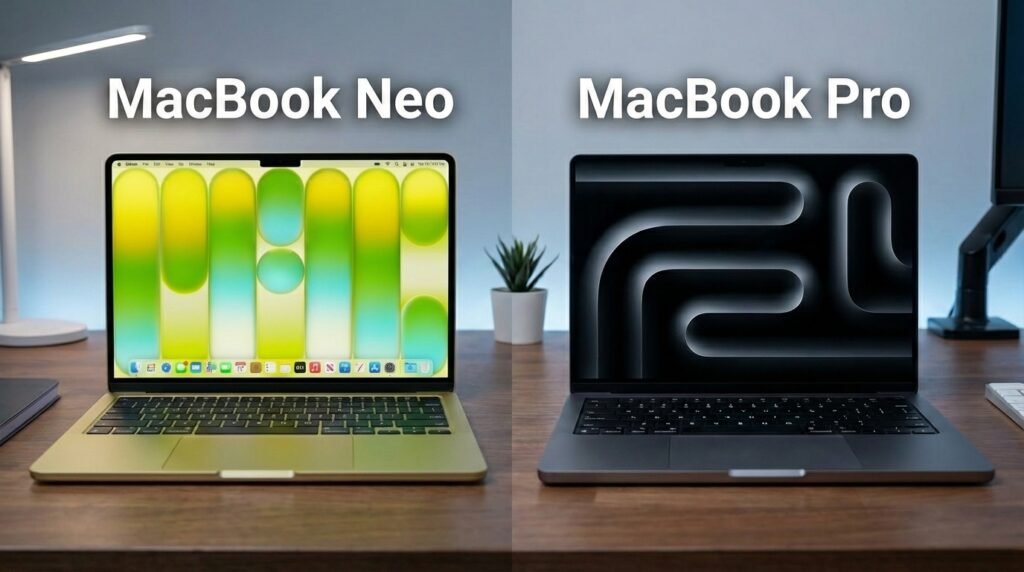
Another comparison many potential buyers make is between the MacBook Neo and the MacBook Pro. While both are part of Apple’s Mac lineup, they are built for very different types of users. The MacBook Neo focuses on affordability and everyday productivity, whereas the MacBook Pro is designed for professionals who need significantly higher performance for demanding tasks.
The main difference lies in the performance tier of the hardware. The MacBook Neo uses the A18 Pro chip, which is optimized for everyday computing and AI-assisted tasks such as browsing, document editing, video calls, and light creative work. In contrast, the MacBook Pro is powered by Apple’s M-series professional chips, which are engineered for heavy workloads such as video editing, software development, 3D rendering, and large-scale creative projects.
Below is a quick comparison highlighting the key differences.
| Feature | MacBook Neo | MacBook Pro |
|---|---|---|
| Performance Tier | Entry-level performance for everyday tasks | High-performance laptop for professional workloads |
| Processor | Apple A18 Pro chip | Apple M-series Pro or Max chips |
| Typical Workloads | Web browsing, office work, school assignments, media streaming | Video editing, coding, music production, 3D design |
| RAM Options | 8GB unified memory | Higher memory configurations available |
| Display | 13-inch Liquid Retina display | Advanced displays with higher brightness and color accuracy |
| Ports | USB-C ports and headphone jack | Multiple high-speed ports including Thunderbolt and additional connectivity |
| Starting Price | Around $599 | Typically starts well above $1,500 depending on configuration |
| Target Users | Students, everyday users, first-time Mac buyers | Creative professionals, developers, and power users |
In simple terms, the MacBook Neo is built for everyday computing, making it a suitable choice for students, casual users, and people who primarily need a reliable laptop for daily productivity tasks. The MacBook Pro, however, is designed for users who rely on their laptop for intensive professional work and require significantly more computing power.
For buyers deciding between these models, the key question is how demanding your workload is. If your tasks mainly involve web browsing, writing documents, attending meetings, and light creative work, the MacBook Neo can handle those activities comfortably. But if your work involves advanced video editing, large programming projects, or other resource-heavy tasks, the MacBook Pro is the better tool because it is specifically built for professional performance.
MacBook Neo Pros and Cons
Every laptop has its strengths and limitations, and the MacBook Neo is no exception. While the device introduces an attractive entry point into the Mac ecosystem with a lower price and modern features, it also makes a few compromises to keep the cost affordable. Looking at both the advantages and the limitations can help buyers make a more informed decision before purchasing.
Pros of MacBook Neo
Affordable entry into the Mac ecosystem
One of the biggest advantages of the MacBook Neo is its price. With a starting cost significantly lower than most Mac laptops, it opens the door for students and everyday users who previously found MacBooks too expensive.
Premium Apple design and build quality
Despite being an entry-level model, the MacBook Neo still maintains Apple’s well-known aluminum design and overall build quality. The laptop feels durable and polished, which is something many users expect from Apple products.
Sharp and vibrant display
The 13-inch Liquid Retina display delivers crisp text and clear visuals, making it comfortable for reading documents, browsing the web, and watching videos.
Long battery life for daily productivity
With battery life that can reach up to 16 hours under typical conditions, the MacBook Neo is capable of supporting a full day of common activities such as studying, working, or streaming content.
Colorful design options
The availability of colors such as Silver, Blush, Citrus, and Indigo adds personality to the device and gives users more choice compared with traditional laptop designs.
Cons of MacBook Neo
Limited RAM configuration
The MacBook Neo currently comes with 8GB of unified memory, which is sufficient for everyday tasks but may feel restrictive for users who work with demanding software or heavy multitasking workloads. Buyers who frequently use professional tools or large applications may eventually notice the limits of this configuration.
Simplified trackpad mechanism
Unlike some higher-end Mac models that use advanced haptic feedback trackpads, the MacBook Neo uses a more basic physical clicking mechanism. While it still works reliably, it may feel slightly less refined compared with premium MacBook trackpads.
Limited port selection
The laptop includes two USB-C ports and a headphone jack, which covers basic connectivity needs. However, users who rely on multiple external devices or accessories may find the number of ports somewhat limited, requiring adapters or docking solutions.
Overall, the MacBook Neo offers a strong balance of affordability, design, and everyday performance, but it is important to understand its limitations before making a purchase decision. For students, casual users, and first-time Mac buyers, the advantages may easily outweigh the compromises. However, users with more demanding workflows should carefully consider whether the hardware specifications meet their needs.
Is MacBook Neo Worth Buying?
A common question many buyers ask before purchasing a new laptop is simple: Is the MacBook Neo worth buying? The answer largely depends on how you plan to use the device. The MacBook Neo is designed to deliver reliable everyday performance, portability, and access to the Apple ecosystem at a more approachable price point. For the right type of user, it can be a very practical and worthwhile choice.
Who Should Buy the MacBook Neo?
The MacBook Neo is particularly well suited for users who need a dependable laptop for daily productivity rather than heavy professional workloads.
Students
Students are among the primary audiences for the MacBook Neo. It offers enough performance for note-taking, writing assignments, attending online classes, creating presentations, and managing academic projects. Its portability and long battery life also make it convenient for moving between classrooms, libraries, and study sessions.
Everyday users
People who mainly use a laptop for web browsing, email, streaming videos, and general online activities will likely find the MacBook Neo more than capable. It provides a smooth experience for typical daily tasks without requiring the higher price of premium models.
Casual creators
Users who enjoy light creative work—such as editing photos, designing presentations, or creating simple content—can also benefit from the MacBook Neo. The system can handle basic creative applications and AI-assisted tools comfortably.
Home office users and remote workers
For people working from home or managing a small home office setup, the MacBook Neo can serve as a reliable work companion. Tasks like video meetings, document editing, spreadsheets, and communication apps run smoothly, making it suitable for everyday remote work needs.
Who Might Want to Avoid It?
While the MacBook Neo works well for many users, it may not be the best option for people with more demanding computing needs.
Professional content creators
Users working with high-end video editing software, large design projects, or advanced 3D applications may find the hardware limitations restrictive.
Developers or power users
People who regularly run heavy development environments, virtual machines, or complex multitasking workflows may prefer a more powerful Mac model.
Best Use Cases for MacBook Neo
The MacBook Neo performs best in scenarios such as:
- studying and online learning
- web browsing and research
- office productivity tasks
- video calls and remote work
- media streaming and casual entertainment
- light creative work
In short, the MacBook Neo is worth buying for users who need a dependable everyday laptop with the benefits of the Mac ecosystem. If your workflow revolves around productivity, learning, and general computing tasks, the device offers a balanced combination of performance, portability, and affordability. However, users with heavy professional workloads may benefit from exploring higher-tier Mac models instead.
If you’re still deciding whether this laptop is the right choice for your needs, it’s always helpful to review a simple buying checklist first. You can explore our complete guide on how to choose the right tech product before buying to make a smarter and more confident purchase decision
Where to Buy Apple MacBook Neo
If you’ve decided that the Apple MacBook Neo fits your needs, the next step is choosing where to purchase it. Fortunately, Apple products are widely available through several trusted channels, giving buyers the flexibility to choose the option that works best for them.
One of the most direct ways to purchase the MacBook Neo is through the official Apple Store. Buying directly from Apple allows you to explore available configurations, check education pricing if you’re eligible, and receive official customer support and warranty services.
You can also find the MacBook Neo at major electronics retailers and authorized Apple resellers. Many large tech stores carry Apple products both in physical locations and online, which can be convenient if you prefer to see the device in person before making a purchase.
Another popular option is purchasing from online marketplaces, where the laptop is often available with multiple configuration choices and delivery options. Online platforms can make it easy to compare prices, check availability, and read customer feedback before buying.
For your convenience, we have also included a purchase option directly within this guide. If you’d like to check the latest price or availability, you can view the MacBook Neo through the link below.
👉 Check the latest price and availability for MacBook Neo here:-

- HELLO, MACBOOK NEO — Ready for whatever your day brings, MacBook Neo flies through everyday tasks and apps. Choose from …
- THE MOST COLORFUL MACBOOK LINEUP EVER — Choose from Silver, Blush, Citrus, or Indigo — each with a color-coordinated key…
- POWER FOR EVERYDAY TASKS — Ready the moment you open it, MacBook Neo with the A18 Pro chip delivers the performance and …
If you choose to purchase through this link, please note that USA Tech Deals may earn a small affiliate commission. However, this does not increase the price you pay in any way. It simply helps support our work so we can continue researching products, testing technology, and creating helpful guides like this for our readers.
Of course, the choice is entirely yours. Whether you decide to buy directly from Apple, visit a local retailer, or order through an online store, the most important thing is choosing the option that feels most comfortable and convenient for you.
Final Verdict: Apple MacBook Neo
The Apple MacBook Neo represents a meaningful shift in Apple’s laptop strategy by introducing a Mac that is more accessible to a wider range of users. By offering a lower starting price while still maintaining the premium design, reliable performance, and seamless ecosystem integration that Apple is known for, the MacBook Neo opens the door for many people who previously felt a MacBook was out of their budget.
What makes this laptop particularly important is how it bridges the gap between affordability and the traditional Mac experience. Students, everyday users, remote workers, and first-time Mac buyers now have a practical way to enter the Apple ecosystem without needing to invest in a higher-priced device. At the same time, Apple has ensured that essential features such as the Liquid Retina display, long battery life, and the A18 Pro chip provide a smooth experience for common productivity tasks.
Overall, the Apple MacBook Neo delivers strong value for users who need a dependable laptop for daily computing. While it may not be intended for heavy professional workloads, it successfully fulfills its purpose as an affordable and capable MacBook for learning, working, and everyday digital life.
Frequently Asked Questions (FAQ)
What is MacBook Neo?
The Apple MacBook Neo is an entry-level Mac laptop designed to provide the core Mac experience at a more affordable price. It features a 13-inch Liquid Retina display, the Apple A18 Pro chip, up to 16 hours of battery life, and a lightweight aluminum design. The device is aimed at students, everyday users, and people entering the Mac ecosystem for the first time.
Is MacBook Neo good for students?
Yes, the MacBook Neo is a strong option for students. It offers reliable performance for tasks like note-taking, writing assignments, creating presentations, attending online classes, and browsing the web. Its portability and long battery life also make it convenient for moving between classes, libraries, and study sessions.
What chip does MacBook Neo use?
The MacBook Neo runs on the Apple A18 Pro chip, which includes a 6-core CPU, integrated GPU, and a Neural Engine designed to accelerate AI-based features. This chip is optimized for everyday computing tasks, multitasking, and modern applications that use machine learning capabilities.
How much RAM does MacBook Neo have?
The MacBook Neo comes with 8GB of unified memory. This shared memory architecture allows the CPU and GPU to access the same memory pool, helping the system handle typical productivity tasks smoothly. For most everyday activities such as web browsing, office work, and media streaming, 8GB RAM is generally sufficient.
Does MacBook Neo support external displays?
Yes, the MacBook Neo supports one external display with up to 4K resolution at 60Hz through its USB-C port that supports DisplayPort functionality. This allows users to extend their workspace by connecting an external monitor for tasks such as productivity work, presentations, or content viewing.
Is MacBook Neo better than MacBook Air?
The MacBook Neo and MacBook Air are designed for different types of users. The MacBook Neo focuses on affordability and everyday productivity, making it ideal for students and first-time Mac buyers. The MacBook Air, on the other hand, typically offers more powerful chips, additional display features, and higher performance for demanding workloads. The best choice depends on your budget and how you plan to use the laptop.
If you found this detailed breakdown of the Apple MacBook Neo helpful, we’d love your support. Please consider sharing this article with others who might be thinking about buying a new laptop, especially students, remote workers, or anyone exploring their first Mac. You can also leave a comment below and share your thoughts or questions — we always enjoy hearing from our readers and discussing the latest tech together.
And if you want more practical tech tips, buying guides, and honest product insights, don’t forget to subscribe to our email newsletter. As a subscriber, you’ll be the first to receive updates whenever we publish new content. Plus, as a thank-you for joining our community, you’ll also get our Smart Tech Buying Toolkit absolutely free, delivered straight to your inbox the moment you sign up.

𝐈’𝐦 𝐒𝐭𝐞𝐯𝐞 𝐇𝐨𝐮𝐠𝐚𝐧, the writer and researcher 𝐛𝐞𝐡𝐢𝐧𝐝 𝐔𝐒𝐀 𝐓𝐞𝐜𝐡 𝐃𝐞𝐚𝐥𝐬.
I help everyday users understand technology—𝐰𝐡𝐞𝐭𝐡𝐞𝐫 𝐢𝐭’𝐬 𝐜𝐡𝐨𝐨𝐬𝐢𝐧𝐠 𝐭𝐡𝐞 𝐫𝐢𝐠𝐡𝐭 𝐝𝐞𝐯𝐢𝐜𝐞, 𝐝𝐢𝐚𝐠𝐧𝐨𝐬𝐢𝐧𝐠 𝐩𝐞𝐫𝐟𝐨𝐫𝐦𝐚𝐧𝐜𝐞 𝐢𝐬𝐬𝐮𝐞𝐬, 𝐬𝐞𝐭𝐭𝐢𝐧𝐠 𝐮𝐩 𝐡𝐨𝐦𝐞-𝐨𝐟𝐟𝐢𝐜𝐞 𝐞𝐪𝐮𝐢𝐩𝐦𝐞𝐧𝐭, 𝐨𝐫 𝐬𝐨𝐥𝐯𝐢𝐧𝐠 𝐜𝐨𝐦𝐦𝐨𝐧 𝐭𝐞𝐜𝐡 𝐩𝐫𝐨𝐛𝐥𝐞𝐦𝐬.
My content blends deep research, expert-backed insights, and real user feedback to bring you clear, practical, and easy-to-follow guidance. 𝐈 𝐚𝐧𝐚𝐥𝐲𝐳𝐞 𝐩𝐫𝐨𝐝𝐮𝐜𝐭𝐬, 𝐜𝐨𝐦𝐩𝐚𝐫𝐞 𝐟𝐞𝐚𝐭𝐮𝐫𝐞𝐬, 𝐬𝐭𝐮𝐝𝐲 𝐭𝐞𝐜𝐡𝐧𝐢𝐜𝐚𝐥 𝐬𝐩𝐞𝐜𝐢𝐟𝐢𝐜𝐚𝐭𝐢𝐨𝐧𝐬, 𝐞𝐱𝐩𝐥𝐨𝐫𝐞 𝐭𝐫𝐨𝐮𝐛𝐥𝐞𝐬𝐡𝐨𝐨𝐭𝐢𝐧𝐠 𝐦𝐞𝐭𝐡𝐨𝐝𝐬, 𝐚𝐧𝐝 𝐛𝐫𝐞𝐚𝐤 𝐝𝐨𝐰𝐧 𝐜𝐨𝐦𝐩𝐥𝐞𝐱 𝐭𝐞𝐜𝐡 𝐭𝐨𝐩𝐢𝐜𝐬 𝐢𝐧𝐭𝐨 𝐬𝐢𝐦𝐩𝐥𝐞, 𝐚𝐜𝐭𝐢𝐨𝐧𝐚𝐛𝐥𝐞 𝐬𝐭𝐞𝐩𝐬.
𝐇𝐞𝐫𝐞 𝐨𝐧 𝐔𝐒𝐀 𝐓𝐞𝐜𝐡 𝐃𝐞𝐚𝐥𝐬, 𝐲𝐨𝐮’𝐥𝐥 𝐟𝐢𝐧𝐝:
Tech buying guides based on verified data and side-by-side comparisons
Product insights that highlight pros, cons, and real-world use cases
Step-by-step tutorials for fixing, optimizing, and understanding devices
Home-office and productivity setup advice
Educational articles that simplify complicated tech concepts
Video explanations featuring me as your on-screen tech guide
𝐌𝐲 𝐦𝐢𝐬𝐬𝐢𝐨𝐧 𝐢𝐬 𝐭𝐨 𝐡𝐞𝐥𝐩 𝐲𝐨𝐮 𝐦𝐚𝐤𝐞 𝐬𝐦𝐚𝐫𝐭𝐞𝐫 𝐝𝐞𝐜𝐢𝐬𝐢𝐨𝐧𝐬, 𝐚𝐯𝐨𝐢𝐝 𝐦𝐢𝐬𝐭𝐚𝐤𝐞𝐬, 𝐬𝐨𝐥𝐯𝐞 𝐩𝐫𝐨𝐛𝐥𝐞𝐦𝐬 𝐟𝐚𝐬𝐭𝐞𝐫, 𝐚𝐧𝐝 𝐠𝐞𝐭 𝐭𝐡𝐞 𝐦𝐨𝐬𝐭 𝐨𝐮𝐭 𝐨𝐟 𝐲𝐨𝐮𝐫 𝐝𝐞𝐯𝐢𝐜𝐞𝐬—𝐰𝐢𝐭𝐡𝐨𝐮𝐭 𝐜𝐨𝐧𝐟𝐮𝐬𝐢𝐨𝐧 𝐨𝐫 𝐨𝐯𝐞𝐫𝐰𝐡𝐞𝐥𝐦.
Stay connected for helpful guides, latest tech insights, and smart recommendations.
Follow us on: YouTube • Instagram • Facebook • X (Twitter) • LinkedIn • Pinterest • TikTok

